The Agent-Ready Website Is Mostly the Web Done Right
An AI agent booked a hotel room last week without a human ever looking at the website. It read the page, found the form, filled in the dates, and moved on to the next task in its queue. That is not a preview of where the web is going. That is a Tuesday in 2026.
So here’s the question on the table for anyone who owns a site. When an agent shows up to read your content or complete a purchase on someone’s behalf, can it actually do the job? Most teams answer that by bracing for a rebuild. They have it backward. An agent-ready website is rarely a new website. It’s the fast, structured, semantic web you already owed your human visitors, plus two or three genuinely new hooks that are still early enough to be optional.
We build sites for a living, and we’ve watched every “the web is changing, tear it all down” cycle since 2000. Most of them were vendors selling a rebuild. This one is different, because the change is real and the fix is mostly boring. That’s a good thing. Boring is cheaper than panic.
What “agent-ready” actually means
For most of the last two years, browser agents worked like a person with bad eyesight and no patience. They took a screenshot, guessed which pixels were a button, clicked, read the screen back to a model, and hoped. It was slow, and it broke constantly, because your site was never talking to the agent. The agent was reverse-engineering your interface every single time, and a redesign could blind it overnight.
Agent-ready flips the direction of that conversation. Instead of the machine guessing at your interface, your site tells the machine what it can do and what each action needs. Two very different things are happening under that one label, and they get conflated constantly. Agents that read want to find you, understand you, and cite you when a person asks a question. Agents that act want to finish a task on someone’s behalf: compare three vendors, fill the quote form, add to cart, check out. Reading is a visibility problem. Acting is an infrastructure problem. Your site has to be good at both, and they are not the same work.
We’ve written before about why your brand is invisible to ChatGPT, and that piece was about the reading half: getting understood and quoted when an assistant answers a question. This is the acting half. The stakes are higher, because a purchase is worth more than a mention, and the plumbing is harder, because completing a transaction reliably is a lot to ask of a machine that’s poking at a page built for a human thumb. You can read about the visibility side in our take on AI search visibility. This article is about the side where the agent has a credit card.
The numbers stopped being hype
It’s fair to be skeptical of any trend that shows up with a fresh acronym every quarter. This one has receipts. Adobe Analytics measured AI-referred retail traffic growing close to 400% year over year in early 2026, and that traffic converted meaningfully better than ordinary search traffic once it landed. The IBM Institute for Business Value found that 45% of consumers already use AI for some part of the buying journey. McKinsey put a number on the destination: somewhere between $900 billion and $1 trillion of US retail influenced by agentic commerce by the end of the decade. Shopify has already exposed more than a million merchants to agent-driven checkout, and Amazon’s shopping assistant is serving hundreds of millions of people.
Now the part the trend roundups leave out. The infrastructure isn’t ready, and the data says so out loud. When Walmart let people buy inside a chat interface, those purchases converted about a third as well as sending the same shopper to Walmart’s own site. Read that twice. The demand is real. The plumbing is not. That gap between what shoppers want to do and what merchant sites can actually support is the entire opportunity, and it’s a build problem wearing a marketing costume.
Most of an agent-ready website is the web you already owe your users
Here’s the deflating truth for anyone hoping to buy a shiny new layer. The single best thing you can do to prepare for AI agents is the thing you were supposed to do for humans all along. An agent parses your page using the same signals an assistive screen reader and a search crawler have always relied on. Clean, semantic HTML. Headings that actually describe the content beneath them. Forms with real labels tied to real inputs. Buttons that are buttons, not a div wearing a click handler. Structured data that states, in a language a machine can read, what this page is and what lives on it.
We made the case a few weeks ago that the prettiest 2026 web design trends are also the slowest, and that argument holds double here. A three-second hero animation that hogs the main thread annoys a person. It defeats an agent outright, because the agent times out before your beautiful thing finishes painting. Core Web Vitals were never just an SEO scoreboard. They’re now the line between a machine finishing a task on your site and quitting halfway through. If you want the full version of that argument, we wrote it up here.
Accessibility tells the same story through a different door. The markup that lets a blind user move through your checkout with a keyboard is nearly identical to the markup that lets an agent move through it with no eyes at all. A labeled field, a logical tab order, a form that announces its errors: a screen reader needs those, and so does a machine. Do the fundamentals and you’re most of the way to agent-ready before you touch a single new standard. Skip them, and no protocol on earth bails you out. The agent is only as capable as the page is honest about itself.
Isn’t this just SEO with a new coat of paint?
Reasonable question, and the honest answer is: partly, and that’s the point. A lot of “optimize for AI agents” advice is the structured-data hygiene good developers have preached for a decade, repackaged with urgency. If someone is selling you an agentic web package that turns out to be schema markup and a sitemap, you’re not being lied to, exactly. You’re being charged a premium for fundamentals.
But the acting half is genuinely new, and it’s where the coat of paint stops explaining things. Search optimization was about being found. Agent readiness is about being operated. A crawler indexed your content and left. An agent wants to submit your form, apply your coupon, and complete your purchase, and it wants to do that reliably enough that a person trusts it with a card. That’s not a ranking problem. It’s an API problem, and it’s why the next section matters even though the last one told you to fix your HTML first.
The genuinely new hooks: WebMCP and llms.txt
Two things are actually new, and they’re worth understanding before you decide how much to bet on either.
WebMCP is the bigger one. It’s a proposed browser standard, backed by Microsoft, Shopify, and Booking.com among others, that lets your site register its own tools through a new browser API. Instead of an agent screenshotting your checkout and guessing at the fields, your site declares its capabilities out loud: here is a “checkout” tool, here is a “filter_results” tool, and here are the exact inputs each one expects. Google opened a WebMCP origin trial in Chrome in the spring of 2026, which means developers can switch it on for real users and test it in the wild. You can read Google’s own writeup on the Chrome for Developers WebMCP origin trial. There are two ways to expose those tools: annotate the HTML forms you already have, or define functions in JavaScript with a schema describing their inputs and outputs. If you’ve ever built an API, the mental model clicks instantly. You’re handing the agent a clean API to the thing your page already does, instead of making it infer that API from pixels.
The honest caveat matters more than the feature. An origin trial is not a finished standard. It can change shape, and it can be pulled. Building your entire storefront around it today would be a bet, not a plan, and we’d talk a client out of it. But if you run a real transactional flow, a booking, a quote request, a cart, it’s worth a pilot right now. The teams that understand WebMCP while it’s still experimental are the teams that ship it well the day it becomes table stakes. Early is cheap. Late is a scramble.
llms.txt is the low-effort one, and there’s almost no reason to skip it. It’s a plain markdown file at the root of your domain, the same basic idea as robots.txt or sitemap.xml, that tells language models what your site is about and which pages actually matter. Adoption sat around 10% of sites by the middle of 2026, so it’s early, but it costs an afternoon and it can’t hurt you. If you’d rather hand the models a curated map of your site than let them guess from your navigation, you write that map yourself. Most companies haven’t bothered. That’s a cheap edge sitting on the table. You can read the llms.txt proposal and have a draft live before lunch.
Agentic commerce commoditizes the middle. Brand is the defense.
Now the part that isn’t a developer problem at all, and the reason this belongs in front of whoever owns the brand and not just the codebase. When an agent does the buying, it optimizes on whatever it can measure. Price, specs, availability, star ratings. If the person only said “find me a good laptop under a thousand dollars,” the agent runs a spec comparison, and the product with the cleanest data and the lowest number tends to win. That’s a race to the bottom, and it’s a race you cannot win by being slightly cheaper than the next feed in the list.
There’s exactly one instruction that changes the whole game, and it comes from the human, not the code. It’s the person naming you. “Order me another one of those from Aerie.” “Book the Kimpton, not the cheapest room on the block.” The instant a human asks for you by name, the agent stops comparing and starts fetching. Distinctiveness isn’t an AI default. It’s the thing that survives the agent. We argued that taste is the only real moat in the AI era, and agentic commerce is where that argument gets tested for actual money. A brand strong enough to be requested by name is a brand the agent has to honor. A brand that only competes on the spec sheet is a line item the agent optimizes away without a second pass.
So the technical work and the brand work turn out to be the same project aimed at the same threat. Being readable gets you into the agent’s consideration set. Being memorable gets you requested by name and lifted out of the comparison entirely. You need both halves. Clean markup with a forgettable brand is a site that agents can use to shop you into a commodity. A beloved brand on a site an agent can’t operate is a name people ask for and then can’t get served. The failure modes are different. The fix is one coordinated push, not two.
Where to actually start
You don’t necessarily need a rebuild. You need a sequence, ordered by what pays off soonest.
Fix the fundamentals first, because they serve people and machines in the same stroke. Semantic HTML, labeled forms, honest structured data, and a site fast enough that an agent doesn’t give up waiting on it. If your Core Web Vitals are in the red, start there and close the trend-piece tabs. Then write your llms.txt, because it’s an afternoon of work almost nobody has done. Then, only if you run a genuine transactional flow, pilot WebMCP inside the origin trial and learn how it behaves before anyone makes it mandatory. Watch it closely. Don’t wager the business on an experiment.
Notice what’s not on that list. Ripping out your site. Buying an “AI-ready” template that looks like every other AI-ready template. Bolting on a widget that promises to make you agent-friendly overnight, the same way overlay widgets once promised to make you accessible overnight and mostly didn’t. The shortcut is the trap. It was the trap with accessibility, and it’s the trap here, wearing new branding.
The agentic web rewards the boring virtues. Structure. Speed. Clarity. A brand worth asking for by name. We’ve been building on those four for twenty-six years, which is a strange thing to feel vindicated by, but here we are. If you’d rather not sort the real signal from the acronym noise on your own, that’s the kind of build we do. Start with the fundamentals this week. The standards will keep. Your Core Web Vitals won’t fix themselves while you wait for them to.
Outbuild Your Competition: The 2026 Construction and Trades Digital Playbook to Win Bids
The modern construction firm must “Go Beyond The Build,” demonstrating the full scope of project mastery from sophisticated design and planning to on-site quality control and final delivery.
Your Website Should Be Your Best Salesperson
Let’s be honest: your website is working harder than anyone on your team. It never sleeps, never takes vacation, and it most likely meets every prospect before you do.
The question is—but, is it actually closing deals?
For construction and trades, your website isn’t just a nice-to-have. It’s your most powerful business development tool. Yes, we know it’s about building relationships, being a great “culture” company, and more… but in 2026, the firms winning the best projects are the ones who’ve figured out that their online presence is what makes the difference in closing big deals.
This playbook gives you everything you need: the strategic framework, real numbers, and practical steps to build a website that converts visitors into qualified leads. Whether you’re planning a redesign or starting fresh, think of this guide as your roadmap to turning your website into a revenue machine.
This is real advice–not an AI bot. Jacob Tyler is a brand and creative agency with over 25 years of experience building global brands and watching them succeed. This is not Ai. This is real talk from real experts working with brands from 1 million to over 4 billion in the A/E/C space.
Look, we know our audience here ranges wildly. You might be a one-truck operation just getting started, or a multi-billion dollar firm with offices in 15 states.
It’s impossible to write one playbook that speaks perfectly to everyone. A 25-year-old launching their first contracting business isn’t thinking like a 60-year-old industry veteran with decades of wins under their belt.
But here’s what we’ve learned after working with over 30 construction companies across every size and stage: the fundamentals don’t change. Whether you’re trying to land your first $100K job or your next $10M project, the principles in this guide will help you do it.
Why Your Website Matters More Than Ever
Here’s the reality: there are nearly 4 million construction companies in the U.S. Construction is still a relationship business. Deals happen over lunch, on the golf course, through referrals from guys you’ve known for 20 years.
But here’s what’s happening while you’re shaking hands: 63% of prospects are already sizing you up online. Your website is their first impression—and for most of them (not the guys you have known for 20 years… although they are reviewing your Website. Trust me.), it’s the deciding factor before they even call you back.
You don’t know what you don’t know. But your customers? They’re looking. And they’re looking online.
Today’s site (whether small or large) needs to do two things exceptionally well: build credibility and generate leads.
The Numbers Don’t Lie
You’ve got 3 seconds on average to grab someone’s attention on your homepage. That’s it. And let’s be honest, 3 seconds can seem like a lifetime when you’re waiting for a page to load. The only worse position to be in would be a boxing ring. You need to make it super fast to prove you’re worth talking to (and winning the fight).
Here’s the reality: 70% of prospects start on mobile. They’re browsing your work from the job site, in the truck, between meetings.
But they’re not making decisions there. That happens later, on desktop—when they’re digging into portfolios, comparing firms, and getting ready to reach out.
So if your mobile site is clunky, you’re eliminated before the real evaluation even starts. And if your desktop experience doesn’t deliver? All that mobile interest dies at the finish line.
You need both. Period.
The cost of getting this wrong? Well if you’re paying for ads, the average cost per lead from search ads in construction is $165.67. If your website can’t convert that traffic, you’re literally burning money. If you’re not paying for ads, you just burned money on a Website that people leave.
Bottom line: in a crowded market, your website is where differentiation starts. Get it right, and you’re ahead of the competition before the first conversation.
The 5 Pillars of a High-Performing Construction Website
A strong digital presence is central to the 2026 playbook. Your professional, content-rich website is the foundation for SEO, lead generation, and winning more bids.
Pillar 1: Show Off Your Work
Your portfolio is your proof. But dumping 200 random projects on a page doesn’t build confidence—it overwhelms people.
Here’s what actually works:
Professional photography that shows the details. Clients want to see your craftsmanship, the scale of your projects, and the finished results. Skip the generic stock photos of hard hats and blueprints. Show your actual team, your trucks, your job sites.
Make it easy for visitors to find what they’re looking for. Organize your portfolio by project type (commercial, residential, industrial) and service (new construction, renovation, design-build). Let people filter to find projects like theirs.
Tell the full story. Go beyond pretty pictures. For your best 15-25 projects, include the scope, timeline, challenges you solved, and what the client said about it. Make it personal.
Before-and-after shots are absolutely worth the effort. They prove the dramatic change you created in a way nothing else can.
Look, we get it. Remembering to snap that “before” shot when you’re managing a dozen things on day one? Nearly impossible. We’ve been guilty of forgetting to do that with our own client brand projects.
It’s not the end of the world if you miss a few. But when you do capture that contrast—the messy teardown next to the stunning finish—it changes how prospects see your work. That visual proof can be the difference between “looks nice” and “we need to hire them.”
What kills trust:
Generic stock imagery – It’s okay to have a few images but let’s try to keep it to a minimum
Walls of text that bury the visuals
Projects from 40 years ago (save those for your company history page)
The Bottom Line: Your portfolio should tell stories, not just display photos. When someone can see themselves in your work—and see the results you delivered for clients like them—that’s when trust begins.
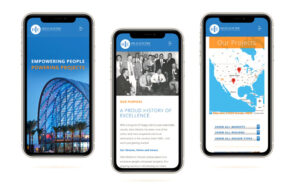
A mobile-optimized website is the foundation of the 2026 digital playbook, immediately showcasing brand history, mission, and geographical reach to potential clients.
Pillar 2: Mobile-First Design That Actually Works
Speed and mobile aren’t “nice features”—they’re deal-breakers.
Google punishes slow sites. In fact, in 2016, our CEO Les Kollegian was hired by Google to speak at their conferences about this exact issue. Here’s the stat that should terrify you: for every extra second your page takes to load, your bounce rate jumps 8X higher.
Think about that. One extra second. Eight times more people, gone.
If you don’t know how to optimize your site properly—and most don’t—you’re hemorrhaging traffic and conversions without even realizing it. And with over 70% of construction buyers starting their research on mobile, building for phones isn’t optional anymore. It’s fundamental.
Don’t get us wrong. Desktop design is EXTREMELY important. However, mobile-first in the A/E/C vertical is how all companies should be thinking. Once they’re evaluating a project or issuing a bid, your prospects are likely to switch to a larger screen to review PDFs, drawings, case studies, and detailed qualifications. A robust, desktop-friendly experience helps with credibility, downloads, and document access.
What matters:
Load time under 3 seconds. Period. Every second longer and you’re losing people.
Easy navigation for thumbs, not mouse cursors. Big buttons, smart spacing. Remember, your best trades might be on a job site wearing gloves. Your best prospect may be doing research while waiting for his/her cocktail at the bar.
Images that look great on small screens. Don’t sacrifice visual impact, but optimize everything so it loads fast.
Simple forms. Mobile users won’t fill out 15 fields. Keep it to name, email, phone, and project type.
Here’s a stat that should scare you: mobile users are 5 times more likely to abandon a site that isn’t optimized. You can’t afford to lose half your audience because your site looks bad on a phone.
The Bottom Line: If your site doesn’t work flawlessly on mobile, you’ve disqualified yourself from the majority of potential clients before they even see your work.
Practical guidance:
Start with a mobile-first design mindset:
Fast load times (optimized images, compressed videos, lean code).
Clear navigation with prominent project gallery, capabilities, and contact.
Accessible CTAs (Get a quote, Request a proposal, Call now).
Readable typography, concise copy, and scannable sections.
Construction is a relationship business–and trust is everything. Your website needs to prove you’re legitimate, capable, and reliable and yes… trustworthy—before someone picks up the phone.
Essential trust-builders:
Show your credentials. Certifications, licenses, insurance, safety records. Display logos from your suppliers and partners. Make it obvious you’re the real deal.
Sounds basic, right?
We’ve worked with companies doing $50 million+ in revenue who don’t do this. Their response? “We have enough business.”
Our response? Do you, though? Because “enough” isn’t the same as “all the business you could have.” What are you leaving on the table by making prospects guess whether you’re legit? Trust signals aren’t just for startups trying to prove themselves. They’re for every company that wants to convert more of the traffic they’re already getting.
Real testimonials with real details. “Saved us 15% on materials and finished two weeks early” beats “Great to work with!” every time. Use names, titles, photos if possible.
Introduce your team. People want to know who they’re hiring. Real photos of real people build connection.
Highlight your track record. OSHA ratings, safety certifications, project completion rates—these signal operational excellence.
Here’s why this matters: 47% of buyers look at 3-5 pieces of content before they’ll even talk to a salesperson. Make it easy for them to say yes by giving them the proof points they need.
The Bottom Line: Trust isn’t given, it’s earned. Your website should make it effortless for prospects to find the evidence they need to feel confident about working with you.
Pillar 4: Make It Stupid-Easy to Contact You
Every page should have a purpose. Every purpose should have a clear next step.
If someone’s interested, don’t make them hunt for how to reach you.
What converts:
Multiple ways to get in touch. “Request a Bid,” “Schedule a Consultation,” “Get an Estimate,” “Download Our Capabilities Deck.” Different people want different entry points.
Click-to-call on mobile. 61% of mobile users will call during the buying process. Make the phone number tappable everywhere.
Contact options that follow them. Sticky contact bars or chat widgets that stay visible as people scroll.
Forms right where they’re looking. Put inquiry forms directly on portfolio pages so prospects can reach out while viewing relevant work.
The math: you’re paying $165+ per lead from search ads. If your site doesn’t make it easy to convert, you’re wasting that investment.
Pro tip: Keep forms short. Name, email, phone, project type—that’s enough for a first conversation.
The Bottom Line: Every page needs a clear “do this next” moment. The easier you make it to contact you, the more qualified leads you’ll capture.
Pillar 5: Get Found by the Right People
A beautiful website is worthless if no one can find it.
The firms that dominate their markets don’t just build great sites—they make sure those sites show up when potential clients are searching.
The technical stuff (simplified):
Make sure your site is fast, clean, and organized in a way that search engines—and now AI—can understand. This includes things like clear page titles, good site structure, and behind-the-scenes code that helps Google, ChatGPT, Perplexity, and other AI tools figure out what you actually do.
Here’s why this matters more than ever: people aren’t just Googling anymore. They’re asking ChatGPT “who are the best commercial contractors in [city]?” or using AI search tools to compare firms. If your site isn’t structured properly, you won’t show up in those results—even if you’re the perfect fit. AI reads your site differently than humans do, and if it can’t parse your information clearly, you’re invisible in the fastest-growing search channel out there.
The content strategy:
Content marketing generates 54% more leads than traditional marketing. Adding a blog to your site increases your chances of ranking on Google by 434%.
Here’s what to create:
Service pages that match what people search for. Think “commercial general contractor in [your city]” or “design-build services in [your region].”
Project case studies with location details. Construction is local. Make sure every case study includes where the project was and what type of work it involved.
Educational content that answers questions. Blog posts like “How long does commercial construction permitting take?” or “What’s the difference between design-bid-build and design-build?” These attract people early in their research process.
The Bottom Line: SEO isn’t optional—it’s your primary lead source. Build it into your website from day one, target the searches your ideal clients are making, and create content that answers their questions. Do this right and your site becomes a lead-generating machine. And for those of you who don’t believe you are being found via search in any capacity. Aehhhhhhhh (buzzer sound). You have NO idea. At Jacob Tyler, we never thought in a million years that an executive at Sony would be upset with his current agency and “search” for another and find us. Being optimized for search got us that account and assistance developing the VAIO brand for Sony. So yeah, we believe. We will give you some more information on “search” in a little bit.
Design Trends That Actually Matter in 2026
Clean and Simple Wins
Less is more. White space, clean fonts, minimal navigation. Focus attention on what matters—your work.
Large Typography
Use of clean and modern typography in a large point type grabs attention and keeps it. Don’t overdo it though. Remember that people need to be attracted to read more and not yelled at.
Video Makes a Difference
Time-lapse build videos, drone footage, client testimonials. Video tells stories in ways photos can’t.
Dark Mode Is Here
Dark backgrounds with sharp contrast can make architectural work pop. It’s modern, striking, and effective. With that said, be careful to not have too much body copy in reverse (white on top of black) as it can make paragraph content more difficult to read.
Subtle Motion Adds Polish
Hover effects, scroll animations, interactive filters. Small details that make the experience feel premium without overwhelming users.
Sustainability Messaging Matters
Affiliations, green building practices, LEED certifications, energy-efficient outcomes—these resonate with commercial clients and conscious homeowners alike.
What a Professional Website Actually Costs
Let’s talk money. Here’s what you should expect to invest:
Small to Mid-Size Firms: $15,000 – $25,000
You get:
15-25 pages
Custom design that’s mobile-responsive
10-15 portfolio projects
Contact forms and lead capture
Basic search optimization
Timeline: 10-14 weeks
Best for: Local contractors, small commercial builders, residential remodelers
Mid-Size to Large Firms: $25,000 – $55,000+
You get:
30-50+ pages
Advanced functionality and design
25-50 portfolio projects with filtering
Integration with your CRM and project tools
Comprehensive SEO strategy
Blog and content marketing setup
Video integration
Timeline: 14-20 weeks
Best for: Regional general contractors, design-build firms, commercial construction companies
Enterprise-Level Firms: $55,000 – $100,000+
You get:
50-100+ pages
Fully custom everything
Multi-location support
Project portals and employee logins
Interactive maps and advanced showcases
Marketing automation
Ongoing optimization and testing
Timeline: 20-24+ weeks
Best for: National contractors, large commercial builders, industrial construction firms
Ongoing Maintenance: $1,500 – $3,000/month
Includes:
Security updates
New project additions
SEO monitoring
Performance optimization
Analytics reviews
Think of this as the cost of keeping your best salesperson sharp and effective. Keep in mind that most Websites as mentioned above can be developed in WordPress, which is infinitely scalable so even though you may start with 15 to 20 pages, you can add as many as you like, and it is super easy to do so.
Mistakes That Kill Conversions
Portfolio overload. Quality beats quantity. Show your best 15-25 projects, not every job you’ve done since 1985.
Ignoring mobile. If it doesn’t work on a phone, you’ve lost the lead. Period.
Hiding your call-to-action. Every page should answer: “What should I do next?” Make it obvious.
Treating SEO as an afterthought. 57% of B2B marketers say SEO generates more leads than anything else. Build it in from the start.
Slow load times. Users leave. Google penalizes. You lose.
No way to track results. If you can’t measure it, you can’t improve it. Set up tracking for form submissions, calls, and key pages.
Stale content. A portfolio that stops in 2019 signals a business that stopped growing. Update regularly.
How to Know If It’s Working
Track these numbers to measure your website’s impact:
Traffic growth (month-over-month and year-over-year)
Conversion rate (forms, calls, downloads as a % of visitors)
Bounce rate (target under 40% on key pages)
Time on site (longer = more engaged
Search rankings for your target terms
Leads generated (qualified inquiries)
Cost per lead (compared to other channels)
Projects won from web inquiries
The goal isn’t to hit industry averages—it’s to beat your own baseline. A 20% lift in traffic or a 0.5% bump in conversion rate translates directly to revenue.
Your 2026 Website Checklist
Use this when evaluating proposals or scoping your project:
Strategy & Planning
Audience personas defined
Competitor analysis completed
Keyword research done
Conversion goals established
Site structure approved
Design & Experience
Mobile-first, responsive design
Loads in under 3 seconds
Clean layouts with white space
High-quality, authentic photos (no stock)
Consistent branding throughout
Content & Messaging
Clear value proposition on homepage
Service pages optimized for search
10-20 featured projects with case studies
Client testimonials (text or video)
Team bios and photos
Trust signals visible (certifications, licenses)
Functionality
Contact forms on key pages
Click-to-call phone numbers
Filterable project portfolio
Blog/resources section
Secure hosting and backups
SEO & Analytics
Google Analytics installed
Search Console configured
Page titles and descriptions optimized
Sitemap submitted
Redirects set up (if redesign)
Post-Launch
Tested across all devices
Monthly analytics reporting
Content update plan in place
Ongoing optimization strategy defined
Common Questions Answered
How much should I really spend on a website?
For most construction companies, expect to invest $15,000 to $75,000+ depending on complexity and scale.
Think of it this way: if a well-designed site generates even 3-5 additional qualified leads per month, it pays for itself within months. The question isn’t “what’s the cheapest option?” It’s “what delivers the best return?”
How long does it take to build?
Quality takes time. Most projects run 10-16 weeks from kickoff to launch. Smaller sites might be done in 8-10 weeks. Enterprise sites with complex features can take 20-24 weeks.
Rushing usually means compromising quality. Launch something you’re proud of, not something you’re settling for.
Do I really need mobile optimization?
Absolutely. Over 70% of potential clients browse on mobile before making a decision. Google ranks your mobile site first. Mobile users are 5X more likely to bail on a site that doesn’t work properly.
If your site doesn’t work flawlessly on phones, you’re eliminating the majority of your market.
Can I just use a template?
Sure, if you want to blend in and hope for the best.
Template platforms like Wix or Squarespace are cheap upfront, but they come with hidden costs that kill your competitiveness. Here’s why they fall short for construction companies:
Speed kills your conversions. These platforms are bloated with code you don’t need. They’re slower out of the box, and you can’t optimize them the way a custom site can. Remember: every extra second costs you 8X more bounces.
You’re locked into their limitations. Need a custom project filtering system? Want to integrate with your CRM? Looking to build something unique that sets you apart? Good luck. Templates box you into what everyone else is doing.
SEO is hobbled from the start. Sure, they claim to be “SEO-friendly,” but you can’t control the technical foundation the way you need to. Your ability to rank for competitive local terms is significantly hampered compared to a properly built custom site.
You look like everyone else. Prospects can spot a Squarespace template from a mile away. When you’re competing for six- and seven-figure projects, looking like a DIY startup doesn’t inspire confidence.
AI can’t read it properly. These platforms generate messy code that makes it harder for AI search tools (ChatGPT, Perplexity, etc.) to understand and recommend your business. You’re invisible in the fastest-growing search channel.
Mobile experience is “good enough” at best. Remember that 70% of your prospects start on mobile? Template platforms give you a responsive site, but not an optimized one. There’s a massive difference.
The bottom line: when your average project is worth $50K to millions, a $200/year website isn’t a smart savings—it’s a costly compromise. Investing in a professional custom site delivers exponentially better ROI because it actually converts the traffic you’re working so hard to generate.
How often should I update it?
A website isn’t a “set it and forget it” asset. It’s a living business tool that needs regular attention to stay effective.
At minimum, add new projects quarterly. Fresh content tells both visitors and search engines you’re active and growing. But there’s more to it than that.
Why regular updates actually matter:
Search engines reward fresh content. Google prioritizes sites that consistently publish new material. A site that hasn’t been touched in six months gets buried, while competitors updating regularly climb the rankings. This isn’t theory—it’s how the algorithm works.
AI search needs current data. ChatGPT, Perplexity, and other AI tools pull from recently updated sources. If your site is static, you’re invisible in AI-powered search results—the fastest-growing way people find contractors.
Your prospects are watching. When someone lands on your site and sees your last project is from 2022, what do they think? Either you’re not busy (red flag) or you don’t care about your digital presence (also a red flag). Fresh content signals momentum and success.
SEO compounds over time. Every new blog post is another opportunity to rank for search terms. Every updated project page strengthens your local SEO. This isn’t busy work—it’s building equity that generates leads for years.
Ideal update cadence:
New blog posts monthly – drives SEO, answers buyer questions, positions you as an expert
Portfolio updates quarterly – keeps your best work front and center
Testimonials as you receive them – fresh social proof builds trust faster
Service pages refreshed annually – keeps messaging aligned with your current capabilities and market positioning
Technical SEO audit quarterly – ensures your site stays optimized as search algorithms evolve
Should you hire someone to manage this?
Unless you have a dedicated marketing person who understands SEO, content strategy, and technical optimization—yes, absolutely.
Here’s why: most construction company owners don’t have time to write optimized blog posts, resize images properly, update meta descriptions, monitor search rankings, or stay current on algorithm changes. And frankly, you shouldn’t. Your time is worth more managing projects and closing deals.
A monthly retainer with a specialized agency or freelancer ($1,500-$5,000/month depending on scope) typically includes:
Regular content creation and optimization
Portfolio and project page updates
SEO monitoring and adjustments
Technical performance optimization
Analytics reporting so you see what’s working
Think of it this way: if your site generates even 2-3 additional qualified leads per month because it’s consistently updated and optimized, that monthly investment has already paid for itself several times over.
The bottom line: A stale website signals a stale business. But more importantly, an outdated site actively costs you leads, rankings, and revenue. Regular updates aren’t optional maintenance—they’re how your website continues generating ROI long after launch.
What’s the difference between a brochure site and a lead generation site?
Brochure sites build trust and credibility through compelling storytelling, professional imagery, and showcases of your work. When designed thoughtfully, they serve as powerful digital portfolios that help potential clients understand who you are, what you do, and why they should work with you. For smaller businesses especially, a well-crafted brochure site with clear contact options and conversion points can be exactly what’s needed to turn visitors into leads.
Lead generation sites take this foundation further by prioritizing conversion at every turn—with multiple strategic calls-to-action, optimized user journeys, lead capture mechanisms throughout the experience, and content specifically designed to move visitors down the funnel.
Both approaches should ultimately drive leads and conversions. The difference is in emphasis: brochure sites lead with trust-building and storytelling, while lead generation sites lead with conversion optimization—but the best sites often blend elements of both.
We have plenty of business. Does SEO really matter?
Look, I get it. We hear this all the time: “We don’t need to worry about our website because we don’t get business from it anyway.”
But here’s the thing—comfort is the enemy of growth.
Think about it: why would you turn down the chance to be considered for projects you didn’t even know existed? Projects where the prospect finds you instead of you having to chase them down?
When we push back and ask “How do you actually know you’re not getting business from your site?”, there’s usually just crickets. Or worse, assumptions based on… well, nothing.
Here’s a story (in case you missed it earlier) that changed everything for us. Years ago, we won the brand development for Sony VAIO products for college students. Want to know how? A Sony senior executive (fed up with his current agency relationship) literally Googled agencies and found us. We didn’t even think that was possible. But it happened, and we became true believers.
Fast forward to 2025. We redesigned the website for Dempsey Construction. About three months after launch, Michaela Weibel, their Director of Marketing, called us—absolutely shocked. She’d been there over five years and had never received a single lead through their website. Not one.
With the new site and proper optimization? Leads started coming in.. and while just a few, it is certainly better than none. Now they’re actually in the game instead of watching from the sidelines. And get this—just one deal pays for the entire website investment and then some.
But it gets even better. At Jacob Tyler, we’re now landing clients through something most agencies aren’t even thinking about yet: generative search.
Sure, people still Google “Best Web Design Agencies in San Diego” or “Construction Web Designer”—and we show up for those. But recently, an executive asked Gemini (Google’s AI), “Who designed the Hensel Phelps website?” Because we optimized our site for generative search, they got the right answer: us. We won that client.
This is the new reality. In 2026, if you’re in construction and you’re not optimized for generative search—especially around your completed projects—you’re invisible to a massive chunk of potential clients.
Should I hire a construction specialist or a general agency?
Here’s our honest take, and we’d be lying if we told you otherwise: you don’t need an agency that only does construction.
We’ve been doing this for 25 years at Jacob Tyler. In that time, we’ve built high-performing websites for health and life sciences companies, medical product manufacturers, ecommerce brands, financial services firms, and yes—construction and industrial companies. The idea that an agency must be vertically niched to deliver results? That’s marketing spin, not reality.
What you actually need is this:
An agency that takes the time to deeply understand your buyers, your sales cycle, your competitive landscape, and what drives decisions in your market. Whether that’s construction, manufacturing, or healthcare doesn’t matter as much as their commitment to learning what makes your business tick.
That said, industry experience does accelerate results.
When an agency has worked with construction firms before, they come to the table knowing:
How to structure project portfolios that actually convert
Which trust signals matter most (certifications, safety records, bonding capacity)
How to optimize for the long, relationship-driven sales cycles typical in construction
What questions prospects ask before they’re ready to request a bid
The balance between showcasing capabilities and not overwhelming decision-makers
That expertise means faster onboarding, fewer missteps, and a site that performs from day one instead of needing months of trial and error.
But here’s what matters more than niche experience:
Does the agency have a track record of driving measurable results? Do they understand conversion optimization, SEO, user experience, and content strategy at a deep level? Can they point to specific outcomes—increased leads, higher rankings, improved conversion rates—across any B2B vertical?
Those fundamentals transcend industry. A team that’s driven results in financial services or life sciences can absolutely apply that same rigor and strategic thinking to construction. The principles of effective digital marketing don’t change just because the hard hats do.
The bottom line:
Choose an agency based on their strategic chops, their commitment to understanding your specific market, and their proven ability to deliver ROI—not just their client roster. Industry experience is a plus and can accelerate results, but it’s not a requirement. Deep expertise in digital strategy, combined with genuine curiosity about your business, will always outperform shallow “niche specialist” credentials.
At Jacob Tyler, we bring both: 25 years of cross-industry experience and a proven track record in construction and industrial markets. That combination means we know what works universally and what needs to be tailored specifically for how contractors buy.
How do I measure ROI?
First, let’s be clear about something: your website is a critical piece of your marketing engine, but it’s not the only piece.
We’d be doing you a disservice if we said “build a great website and watch the leads roll in.” That’s not how sustainable growth works. Your website needs to work in concert with your brand, your relationships, your presence at trade shows, your direct mail, your reputation in the community, and yes—even those conversations on the 19th hole.
That said, your website should absolutely be measured and held accountable for ROI.
Here’s what to track:
Qualified leads generated – how many serious inquiries came directly from the site
Conversion rate – percentage of visitors who take action (form fills, calls, downloads)
Revenue from web-sourced inquiries – actual project wins that started with your website
Cost per lead – compare what you’re spending on the website against other channels like trade shows, print ads, or pay-per-click
Most construction firms find that once their website is properly optimized, it delivers the lowest cost per qualified lead of any marketing channel. Even modest improvements—like a 1% conversion bump—can generate hundreds of thousands in additional project value annually.
But here’s the bigger picture:
Your website doesn’t exist in a vacuum. It’s the hub where all your other marketing efforts converge:
Someone meets you at a trade show → they Google you → your website seals the deal (or kills it)
A referral mentions your name → the prospect checks you out online → your site validates the recommendation
You run targeted ads → traffic lands on your site → conversion optimization determines if that spend pays off
Your brand shows up in their LinkedIn feed → they click through → your website tells the full story
Think of it this way: Your brand is your reputation. Your website is where that reputation gets verified and converted into action. Traditional marketing—networking, events, direct outreach—gets you in the conversation. Your digital presence determines whether that conversation becomes a contract.
So yes, measure your website’s performance religiously. But don’t forget that your entire marketing ecosystem—brand positioning, consistent messaging across channels, strategic relationship building, and traditional outreach—all work together to drive revenue.
The website is your best salesperson. But even the best salesperson needs leads to close. That’s where the rest of your marketing comes in.
Your Website Is Your Competitive Advantage
In 2026, your construction website isn’t a cost center. It’s a strategic asset that either generates revenue or bleeds opportunity.
The firms winning the best projects understand this: your website is a business development engine that works around the clock. While your competitors are still treating their online presence as an afterthought, the leaders in your market are converting browsers into bids—24/7, without a single sales call.
Here’s the math that matters: construction websites average around a 2% conversion rate. That means 98 out of 100 qualified prospects leave without contacting you.
Now imagine cutting that waste in half. Better mobile experience, faster load times, clearer calls-to-action, stronger portfolio presentation—these aren’t cosmetic upgrades. They’re the difference between doubling your lead volume and watching opportunities go to competitors who got the details right.
Combine that with smart SEO and a relentless commitment to showcasing your best work, and you’ve built something that compounds: a platform that gets stronger, ranks higher, and generates more qualified leads every month—without you spending another dollar on traffic.
For owners and marketing leaders evaluating partners, the criteria are simple: find an agency that understands how construction buyers make decisions, builds for conversion not just aesthetics, and measures results in leads and revenue, not likes and page views.
The investment in getting this right pays dividends for years. The cost of getting it wrong? You’re already paying it—you just don’t see the opportunities you’re missing.
Let’s Talk About What’s Possible
If you’ve made it this far, you already know your website could be working harder for you.
Maybe you’re frustrated watching leads go to competitors with slicker digital presence. Maybe you know your site doesn’t represent the quality of work you actually deliver. Or maybe you’re just tired of leaving money on the table because your online experience doesn’t match your reputation in the field.
We get it. We’ve spent 25 years helping companies in construction, industrial, and beyond turn their digital presence into a genuine competitive advantage—not just a prettier version of what everyone else has.
Here’s what we believe:
Your website should earn its keep. It should generate qualified leads, support your sales team, and prove ROI. If it’s not doing that, something’s broken—and it’s fixable.
You shouldn’t have to become a digital marketing expert to make this work. That’s what partners are for. Our job is to understand your business, your buyers, and your goals—then build something that delivers results you can measure.
If you’re ready to explore what’s possible, here’s how we typically start:
Have a real conversation. No sales pitch. No generic proposal. Just an honest discussion about where you are, where you want to be, and whether we’re the right fit to help you get there.
Build a plan that makes sense for your business. Not a one-size-fits-all template. A strategy tailored to your market, your goals, and your timeline.
Execute with accountability. We measure what matters—leads, conversions, revenue—and adjust as we learn what works best for your specific audience.
The firms that are winning in your market aren’t doing anything magical. They’re just committed to making their digital presence as strong as their craftsmanship. And they’re working with partners who understand that construction isn’t sold the same way software or sneakers are.
The best time to fix this was last year. The second best time? Right now.
If you’re curious about what’s possible for your business, let’s talk. No pressure, no pitch—just a conversation between people who care about building things that work.
Schedule a consultation or reach out and fill out our own lead form at www.jacobtyler.com. Hell… just call our CEO (Les Kollegian) directly at 619-379-0007. We’re here when you’re ready.
The Key Benefits of Social Media in eCommerce
At first blush, the idea of being an online merchant may seem way easier than running a brick and mortar store. All you need is to decide which ecommerce platform is right for you, upload photos of your services or merchandise, and let the money roll in, right?
Uh, not exactly. Your first order of business is to reckon with the fact that you’re up against millions of competitors who also thought that being an online merchant would be a cinch (or at least a good idea). Add to that the tangled task of curating your social media channels to sharpen your brand visibility. In many ways, the world of digital advertising can be split into social and SEO. We’ve written before about ecommerce SEO best practices—but how can social media also help you expand your ecommerce operation?
First, let’s delineate a few related terms—social selling, social commerce, and social mediaecommerce marketing:
Social Selling: Using social media to find and nurture sales prospects.
Social Commerce: Selling services and products via social media storefronts. (Facebook Shops, Instagram Shops, Pinterest’s Product Pins, the Collections feature of Snapchat, and so on.)
Social MediaEcommerce Marketing: A broader category that encompasses building brand awareness, routing web traffic to your site, advertising and selling, as well as social selling and social commerce.
For this blog, we’re going to focus on how social mediaecommerce marketing can enhance your ecommerce presence. Considering that 44.8% of internet users use social media to find brand-related information, and that consumers spend about two and a half hours per day on social media, developing social tactics tailored to your ecommerce store may help you reach a larger audience and bolster your bottom line. So let’s explore a few ways you can use social media to build your ecommerce brand.
Define Your Conversion Goals
Before you sprint ahead and sign up for accounts on all the major social media platforms, you need to ask yourself which one is right for you. Research who your target audience is, which social channels they frequent, and what types of content they engage with. Imagine that you’re a working, traveling mom of young children who shares tips via Instagram about how to navigate planes, trains, and automobiles with a few tykes and a cooler of breastmilk in tow. Your target demographic is probably going to be working, traveling moms of young children—women who may be about 25–35 years old, who frequent Instagram and Pinterest, and who are just as tech-savvy as the person serving them content.
With this audience in mind, determine the end-goal of your social strategy. Are you trying to drive them to your site, or are you engaging in some good-new-fashioned social commerce (which we’ll get to later), or both? Let that quandary marinate, and then let the platform you decide to use help you hone in on your objectives. Instagram and Facebook, for instance, let businesses pick one of three conversion goals:
Catalog Sales: Allows you to pull products from your catalog and put them into ads.
Conversions: Helps you encourage your audience to take a specific action on your site. (Add a product to your cart, for instance.)
Store Traffic: Tailored to brick and mortar shops, this ad goal helps you promote your store to customers who are nearby your store.
Instagram and Facebook also let you pair ad formats to your campaigns—usually through video, image, carousel, or collection ads. That last option is a handy tool for ecommerce brands, as it’s designed for vendors to show off their wares, which helps them tap into the importance of mobile commerce. But scope out the sales features of all the big social platforms to figure out which ones will best showcase your products and services.
Build Brand Awareness
Perhaps the key benefit of developing a social mediaecommerce strategy is that you can expand your brand awareness. Branding is crucial to your business because it tells your story, establishes trust, and clarifies how you stand out among all the other ecommerce brands out there. Consider social media to be an opportunity to show off whatever makes your brand unique—the depth of your expertise, the empathy you have for social movements, or that penchant of yours to make total strangers laugh out loud. (If that last point sounds trite, remember that humor is a surefire way to drum up a following or clinch a sale.)
An inevitable question lurking about this topic is how social media impacts ROI. Unfortunately, those calculations can get squirrely, because social media often amounts to an engagement strategy with your audience that increases how many people know about—and, ideally, like—your brand. Social media, as they say, is about retention, not acquisition. So transmuting metrics of audience reach into money can turn into a guessing-game. Still, we know that 53% of Americans who follow brands on social media become more loyal to those brands, and that the key to increasing the awareness of your ecommerce store through social media is to post consistently.
Tweet out a fleeting thought once every six weeks, or livestream on Instagram a few times a year, and you won’t see any uptick in the number of people who follow you. Instead, be an active presence on your channels, reply to your customers’ comments, and create content that consumers find valuable. If your posts fail to give your audience the answers they’re looking for, they’ll seek out other social accounts that they find to be more resourceful.
Sell Through Social Commerce
Remember the social commerce options that we listed at the outset of this blog—Facebook Shops, Instagram Shops, Pinterest’s Product Pins? Take full advantage of them. They’re free, and they’re integrated to make the sales process easy. Plus, Facebook and Instagram are better known than you are (at least, we’re assuming they are), so until you become a household name, capitalize on the legitimacy they impart on their users. Somebody coming across “Wacky Bob’s Ecommerce Emporium of Miscellaneous Wonders” via a Google search might think twice about clicking that link, but somebody who finds a miscellaneous wonder that Wacky Bob’s selling on Facebook Shops might figure, okay, Facebook’s vetted this guy, so this will be a safe transaction.
Many brands far more prominent than Wacky Bob, such as Target, use social commerce to add videos, post reviews, list events, upload photo albums, include maps of nearby stores, and create abundant opportunities for people to browse products ranging from honeywood blossom candles to the Martha Stewart MTS-PS10 telescoping electric pole chain saw. (Which, at $99, feels like a steal.)
Let’s say that you do want to buy Martha’s telescoping chain saw on Target’s Facebook page. You’d click the “View on Website” button, which would link you off to Target’s site. For other transactions, that button might read “Buy on Facebook.” You can link up your social media accounts and purchasing channels into a warp and woof of loops and connections, but the fundamental point here is to bear in mind what you’re selling. Candles or chainsaws of summer swimwear—sure, snap a pic and throw it on a Facebook or Instagram Shops page. For more complex sales, however, where users need to examine and mull over the thing they’re purchasing—engagement rings and mortgage refinancing terms and leases for senior living communities all come to mind—social commerce is probably not the best channel to sell on, since users tend to make snap decisions on social and buy the same way they would pull clothes off a rack at Target a few hours before going to a party. Instead, nurture prospects of more intricate sales on your website. And speaking of which …
Drive Traffic to Your Site
One downside to social commerce is that, although selling through the shopping interfaces of major platforms has its perks, you are still, in some sense, selling under the awning of another merchant’s storefront. Another tack you might take is to set up your social media accounts to serve as a slip ’n slide that routes users into your site—the checkout counter that you control. Consider the sheer volume of users that you could reach advertising on these channels:
Facebook: 190 million people.
LinkedIn: 170 million people.
Instagram: 140 million people.
Granted, the audience interested in your niche is probably a fraction of all those unwashed masses, and only companies with canyon-deep pockets can afford to pay enough to plunk content in front of most of them. But let’s say you’re that Instagram startup influencer who posts traveling tips for working moms. Social media can serve your operation as an inbound marketing tool, sending other working, traveling moms to your site to buy your training materials or hire you as a consultant.
Our advice for this influencer is to observe the 80/20 rule of social content, which holds that 80% of your strategy should be quality posts or videos, while 20% should be CTAs or discounts that promote your brand. Remember how we said that social and search comprised the two spheres of digital advertising? Those spheres often overlap. Case in point: The more that users share your social content, the higher your ecommerce store will float up the SERPs (or search engine results pages). Which makes sense: Inundate people with offers and they may think you’re spamming them. Share content that interests or educates them, and they’ll keep following you—and even look forward to the next time that you post.
Collaborate With Influencers
Another benefit of social media: The ease with which you can team up with influencers that your followers love, or with another brand in your niche that can introduce your business to a larger audience.
Again, let’s say that you run an Instagram account with tips for mothers of young children who travel for work, finding ways to pump or store breastmilk in an airport or a convention center. Reach out to an influencer who specializes in car seat safety or Yeti coolers:
Interview them for your podcast.
Ask them to review your site and services.
Host a Q&A session on Instagram Live about the industry you’re in.
Newsjacking, or the art of aligning your brand with a topic that’s trending, is a related strategy. As everyone with a New York Times app knows, each day brings a fresh opportunity for the media to blast us with “Breaking News” updates. So if you’re overseeing the aforementioned Instagram account and a story breaks about all the Yeti coolers in North America have been recalled due to safety concerns, your task is now to newsjack that report before another story breaks in its place and sweeps it away. Comment on it. Post a video about it. Redirect people to all the Igloo or Coleman coolers that you’re selling on your ecommerce platform (rather than anything that that charlatan Yeti’s peddling these days).
To generate user interest in your content, you could also partner with your own users. Encourage your viewers to share their stories about how traversing the TSA checkpoint at an airport is 1,000 times more harrowing with an infant or a suitcase of pumping equipment. Give them the stage to explain how the Mother’s Lounge is a life-saving oasis, the Starbucks barista can’t grasp why you need a cup of hot water to warm up a bottle of milk, and the passengers on your flight are put out that you’ve brought your child with you, but what they don’t understand is that you’re in Mama Bear mode and your baby isn’t on the plane with them—they’re on the plane with your baby.
Asking your followers to post about their experiences will help consolidate a community that becomes loyal to your brand. Once you’ve amassed a following, point them in the direction of a third-party website like Amazon where you sell some of the products that you trust or that you developed. A tactic like this is akin to leveraging the influence of platforms like Facebook or Instagram to engage in social commerce. Uploading products into Amazon will let you capitalize off the legitimacy of the largest ecommerce brand in the galaxy—and help you set up your shop amid a more rapid stream of digital traffic than you may be used to sustaining.
We often think of social media as the top-of-the-funnel channels where you charm and attract users to your brand, rather than an opportunity to close a sale. Yet the recent innovations in social mediaecommerce may be changing the character of social from an organic customer acquisition generator to a paid media model. Time will tell. For the last 21 years, we’ve seen social media undergo seismic changes, and our job involves monitoring its ever-shifting uses and features and advising our clients how to harness it to achieve their goals. Reach out to learn how the insights of this social media agency can benefit your ecommerce brand.
How Social Media Impacts ROI:
Social media is the great leveler of our age, the apotheosis of the shift from the one-to-many to the many-to-many models of communication, the subway train that banker and bus-boy alike all ride. In certain ways, it’s also the most complex innovation in digital marketing, so it’s worth remembering that digital ad spend eclipsed traditional advertising budgets in 2019. By 2023, digital will comprise over two-thirds of total ad spend. Point being, social media seems here to stay, and companies should use it to maintain an ongoing conversation with the world—enhancing their brand awareness and extending their customers’ lifetime value.
Yet even though social media may be the preferred advertising art form of the future, it’s still often so unruly, so hard to track and control. Social content can send shock-waves through the internet, conjuring up a tsunami of likes and shares and reposts, but—was it worth the cost? Hard to say. Or, at least, hard to correlate those intangible results to sales figures on a 1:1 basis. So how do you quantify this most qualitative medium? You’re about to find out.
Calculate Your Investment
If you want to determine how your social media marketing impacts your return on investment, you need to keep a record of your investment. Tab up the cost of the platforms that you’re using. (Most are free, but you may be paying for a premium version of a management tool, etc.) Then take note of the money that you spent on paid digital ads and on labor. Correlating a content creator’s salary to the results that come back probably isn’t arithmetically sound, but it’s worth poring over hours billed per project or how much you’re shelling out to freelancers.
The meaning of the numbers that bubble up may depend on how your social media eventually performs. For the moment, though, tally it up and put it aside.
Match Metrics to Goals
As you track how much you’re spending, determine what you want to accomplish with that money. Do you want to improve your SEO, add new email signups, sell more puppy-training sessions through your ecommerce platform? Pinpoint your goals, then calibrate the results with metrics that are commensurate to the value of those goals.
Let’s say that you want to improve your SEO. Measure whether your bounce rate goes up or down—but not whether your profits go up or down. Conversions and site traffic and lead generation all tie together, but they’re also distinct returns. So choose the yardstick that you want to plunge into the market, and benchmark your current stats so you can compare them with the outcomes. Knowing how you perform now will give you a sense of how realistic your goals are. Imagine that 100 people have signed up to your email list. Adding another 100 this month is—to put it mildly—ambitious. Adding another 10? Doable, and a good goal.
Bear in mind, though, that there is a bewildering array of objectives that you could achieve and KPIs that you could measure. So, we beg of you, don’t try to measure them all. Track a few metrics—and track the right metrics. A savvy social media marketing agency might tell you that views, likes, retweets, and followers are considered “vanity metrics.” Sure, it feels nice when someone gives your post a thumbs up, but it doesn’t necessarily translate into a business result (like a sale or a new customer). Whereas other insights are more illuminating:
Bounce rates tell you if you’re maintaining your audience’s attention.
Engagement rates tell you how many people are commenting on your posts.
Converting click attributions tell you which ad a customer clicked on before making a purchase. (More on this stat later.)
Sharpen Your Tools
Since tracking and measuring are integral skills in social media marketing, it should come as no surprise that instruments galore exist to crunch the numbers on how social impacts ROI. Here are just a few of them:
Hootsuite built a calculator where you can plug in data like Facebook visits or landing page conversions and match them against your overall investment.
If you want to get precise about those visits and conversions, let Google Analytics give you a panoramic view of all the numbers flowing through your funnels.
Building links with UTM parameters helps you understand which sites your visitors came from, which channels routed them in, which part of a promotion they clicked on, and so on.
The takeaways that these tools provide, in sum, indicate which of your marketing efforts you should work on because they’re underperforming—as well as which ones are over performing, and need some extra rocket fuel poured on them.
Don’t Wait to Iterate
A good digital marketing agency is always measuring the results of a campaign, but they should also measure different versions of that campaign to gauge which one impacts ROI most effectively. So keep A/B testing. Target different audiences. Experiment with a range of tones. Tinker with the copy and the CTAs. Sub out a carousel for a pulldown ad. See what works, but also adopt the mindset that no one thing “works.” The market’s always in flux, so be ready to pivot on strategies as you monitor which aspects of a campaign your audience responds to the best.
Companies that don’t like how their audience is responding—or that panic because their audience isn’t responding at all—sometimes hose out more content as a quick-fix solution. Beware this tactic, because inundating the market can feel spammy. In a word: Slow it down. People prefer digital experiences that feel well-executed and personalized to them rather than torpedoed willy-nilly in their general direction.
Redefine the Return
You know how much money you’ve piped into your social media plan, and now the results are coming back. But what do the numbers mean? A reasonable business leader might assume that one dollar spent on social media should return at least one dollar in revenue. As we’ve indicated, though, your upfront return might not even be money at all.
Strictly speaking, companies don’t need social media. Factories and restaurants and brokerage offices would pump along just fine without a Facebook account. But having social media imparts legitimacy onto your brand. Think about it: If you’re applying to an engineering firm, but they don’t have a LinkedIn page, wouldn’t they seem behind the times to you? (Like, probably-not-much-career-growth-here behind the times?)
Without a social media presence, you also lose opportunities to stake out what distinguishes you from the competition. Look at this Ben & Jerry’s tweet about how Brown v. Board of Education led to the school-to-prison pipeline. The comments that their post garnered range from “This is why you’re my favorite brand of ice cream” to “Bro, you’re ice cream.” Yet Ben & Jerry’s is at least positioning itself front and center in the public forum. Is this positioning performative or genuine? Up for debate. But it seems that the value of engaging with multiple audiences about a complex topic on social media may be cultural cachet and brand visibility rather than a single line-item amount.
Give it Time
Print advertising was all about big, bold declarations—billboards or magazines plastered with headlines that wowed viewers. Digital advertising is less about seizing an audience’s attention and more about serving them bite-sized reminders across the channels they frequent. One of the difficulties with social media is that it’s snackable, and perfectly suited to serve up those reminders, but it moves so quickly that it can put campaigns into hyperdrive, truncating the lifespan of a marketing investment and making its results too intertwined to unthread.
Remember “last click attributions”? That metric can help you see how a post might lead to 100 people clicking into your site and spending $5,000 on your product. All that’s useful to know, but some marketers argue that the insights it provides are somewhat blindered—it doesn’t take into account the other touchpoints that had previously introduced the customer to a brand. After you Googled, “I want the best vacuum cleaner,” Dyson and Shark ads may have popped up on your social platforms. You did your research. You were leaning toward Dyson. Then you saw one last Dyson ad on Facebook and clicked the link and made the purchase.
That single Dyson ad may not have been the superstar in this scenario. Maybe it was just the last reminder in a series of waves and winks—many of which happen through multiple interactions with Dyson’s social media that are hard to alchemize into dollars. So even though social media is fast-paced, give it enough time to mature and glue together all the collateral that contribute to your brand awareness. The return you get on that may be immeasurable.
Five Tips on How to Launch Your eCommerce Brand
One of the most impactful lessons we learned from 2020 was that so many of our everyday activities can now be done online, from shopping to going to college to sitting in on meetings, more easily than a lot of us even realized (and in pajama bottoms, no less).
Take online shopping (or ecommerce — the electronic buying and selling of goods): In 2019, online shoppers spent $598 billion with US merchants. The following year, with all of us stuck at home, that number zoomed up to $861 billion. Analysts estimate that the number of digital buyers worldwide will reach 2.1 billion by 2021, up from 1.66 billion in 2016.
As you can probably imagine, corporate behemoths dominate this space. (According to some estimates, Amazon accounts for 44% of all ecommerce sales.) To survive in today’s market, small and medium-sized entrepreneurs need to siphon off some of the proceeds their larger competitors are raking in, shaping their digital marketing strategy to offer online shopping and mobile payment options to customers. So if you’re not already in this game, here are five tips on how to launch your own ecommerce brand.
Figure Out Who You’re Selling To
“Who is my target audience online?” That’s the first question you need to ask in creating an ecommerce presence. Theoretically, your product options are endless. You could be trafficking in candles, rain barrels, hazmat suits, second-hand Aston Martins, bulk lumber — and you might have a supply of these items already stored away in your family warehouse. But your business nonetheless starts with figuring out who wants all that stuff. So identify your user personas and hone in on what they’re looking for within your service or product category.
Once you’ve sketched out the demographics of your audience and the demand for what you’re selling, decide on a revenue model that you can control. Do you have local or global reach? Are you selling a service or a product? Are you piggybacking off other platforms’ services and products? Answering these questions should nudge you into running a hard-nosed calculus of how much all this will cost. Project your revenue against your expenses so that you can clarify your profit margins and anticipate your breakeven point with some accuracy. Because the last thing you want when starting a business is to be served with a tab of pricey surprises.
Write a Business Plan
You’ve figured out who you’re selling to. You may have even sourced a supplier. Now you need to engage in competitive analysis. A word to the wise: You do want some competition. A market space with no competition can indicate there’s no market. At the same time, be wary of jamming your way into a crowded sector, or buying a slew of products in an attempt to topple the Amazons of the world. Especially if you’re starting out, you probably don’t want to position yourself as everything to everybody.
Instead, focus on a niche that you’re passionate about and that performs well on social media. Let’s say you want to sell plants online. Research other plant nurseries. Look at their prices. Audit their websites. Take note of their shipping timelines. Get a sense of how their marketing strategy works. All of those insights will help you address one of the capstone questions every business must answer: What do you offer that separates you from your competitors?
Exert pressure on your answer until you make it as granular as possible. Then write up a business plan that consolidates your ideas and clarifies how you’ll reach new customers. And while you’re at it, make allies among your competition. Working with other business owners in your space to cross-promote products, or becoming an affiliate of a larger company, can help bring in much-needed dollars as you grow.
Choose a Name
Next, choose a name for your business, one that’s preferably pithy, leaps melodiously off the tongue, and that no one has already claimed as a domain name. A year ago, there were (oh, give or take) 366.8 million domain names registered online, so be sure your business name transfers to a domain name that no one else has called dibs on. If you’re “Plants-a-Million,” you do not want to settle for a URL of Plantz-a-Million, because a disconnect of even a single character may send your prospective customers spiraling into tizzies of frustration.
With that said, if Plants-a-Million.com is taken, you can always use plenty of other extensions — .net, .biz, .me, .co — because people rarely type in full web addresses anymore. They click on an ad or a link, or they dive through a warren of Google’s rabbit-holes, and somehow emerge having ordered half a million bromeliads off your ecommerce site.
Brand Your Brand
After you claim a domain name, hire a brand agency to build a website for you, create a logo and a consistent design, and develop a digital marketing strategy that will drive traffic to your site. Don’t settle for anything less than blogs integrated with keyphrases, metadata built into the backend of the CMS, omnichannel research that identifies where your customers shop and marketing funnels that lure them away from the competition and into your online store. (And give us a shout if you want it done right.)
Prepare for Launch
By this juncture, you’re prepared for perhaps the most vital step of all: Opening up your online store. Especially for entrepreneurs launching their first ecommerce brand, we recommend selling through bona fide ecommerce platforms like Woocommerce, Magento, or Shopify — one-stop-shop interfaces that come with software such as a storefront, a payment processor, a shipping partner, a back office, and a marketing HQ. Those platforms are just three of hundreds of options out there, so research the distinguishing features of a number of them to make sure the platform you’re signing up for is compatible with your business needs.
Throwing open the doors to your online storefront can be exciting — and it’s most likely going to continue to become the preferred bazaar of the future. Budget at least 18–24 months to launch an ecommerce brand and get it into the black, because the adage about spending money to make money applies here. If you come up with a plan and execute it with patience, though, you’re well on your way to branding your baby and converting browsers into buyers.
Let the ecommerce commence.
9 Ways to Boost Your SEO
When was the last time you ventured past the first page of a Google search? Unless WebMD has freaked you out — along with the rest of us — and you’re clicking deeper and deeper to make sure your papercut won’t give you typhus, you probably just pop a question in the search bar and hit the first link that appears. If that’s the case, then you’re among the 75% of users who never dig beyond the first page of a search.
Which makes sense: People are lambasted with choices these days, and to avoid decision paralysis, our minds tend to scramble for a single answer. That’s why a menu with five dishes seems more svelte than a menu of five pages. If you’re a business, you want your site to be the first option on the menu. And the way to get there? Search engine optimization, or SEO. Here are nine SEO techniques that can help buoy your site to the top of the Google Machine.
Anticipate Why People Come to Your Site
Search engines are (to a large extent) in the business of finding answers for people. Type in “Best Wines to Buy,” and Google will list pages of wine shops and purchase options. Now type in “Awesome Vineyards 2021,” and you’ll get a spate of world’s-best-wineries sites and tour schedules. So ask yourself: What do you want people to do on your site? (Hire you? Apply for a job? Read your favorite recipe?) Tailor your content so that search engines identify which questions you’re answering and how their users will benefit from finding you.
Value Your UX
Enticing visitors to click through your site enhances your SEO, because Google recognizes that your pages are useful for its customers. So make your UX clear and navigable. Intersperse text with images and videos, chunk up your layouts with H1-H2-H3 header tags, and stay open to using white space (which calms the eye and makes content more readable). And never, under any circumstances, use popups. Just … no, people. No.
Prize Quality Over Quantity
To get noticed online, you’ll want to push out content optimized with keywords, but Google penalizes you for keyword stuffing, in part because the average Googler will stay on sites that feel timely and smart longer than they will on sites that read like a robot wrote them. Some studies also indicate that long-form articles (over 3,000 words) attract more traffic and shares than smaller articles (between 901–1,200 words). So feel free to blast on, but keep it fresh.
Optimize, Optimize, Optimize!
We all know writing with keywords optimizes your copy, but images can boost your SEO, as well. Images that are too large drag down a page’s loading time, so whenever possible, resize or compress them. Save photos as JPEGs and line art or text-heavy images as PNGs. And add in alt tags (or “alt attributes”) into the code on the back-end of those images, which helps browsers find your site and also satisfies a number of accessibility requirements.
Be the Strongest Link
SEO agencies will advise you to link your content to external articles, but don’t discount the value of internal links, either. If you audit your site’s information hierarchy, you may find that some pages are viewed more often than others. Linking the oft-viewed pages to less-viewed pages will flow traffic to those neglected child-pages, helping Google discover and crawl them. That, in turn, improves the SEO of your site as a whole.
Play Tag
Write title tags and meta descriptions in the back-end of your site. Title tags are the headings of a page, and meta descriptions are text that appear in a search below those headings. Imagine that you’re writing for the “Venues” page of a state park. “Venues | State Park” is the title tag, while your meta description should be phrased like a CTA. (“Rent our venues at your state park …”) Together, title tags and meta descriptions are behind-the-scenes heroes vying for Google’s attention when someone types in, “Where can I rent venues at my state park?”
Go Niche
Around 4.5 billion people currently have access to the internet, so how do you carve out your own space online? You find a niche. You like gardening, but so do millions of other people, so you focus on how to grow orchids in a cold climate. You love sports, but so do the rest of us, so your site covers the latest in chess boxing or underwater hockey. You — well, you get the point. Hone in on the thing that enough people care about but not enough people talk about and build your content strategy around providing answers in that space.
Jump in the Conversation
Remember how we said search engines find answers for people? As any SEO agency will tell you, the people with the answers are often referred to as “authorities.” You can establish your authority through blogging or linking to other authorities, but you can also find a Q&A site like Quora and answer questions there. Airing your opinion too often might get weird, but giving a real explanation now and again and linking back to your site — when it’s warranted — tells search engines that you’re a reliable source within the cosmos of information floating online.
Nab an Interview
We get it — convincing someone to interview you is about as easy as landing an interview at your dream job. (In other words, not very.) So you may as well start your hustle now, because interviews operate like SEO word-of-mouth and augment your site’s visibility. Email bloggers to see if they want to chat. Talk to your buddy’s buddy who’s got a podcast. Getting on the talk-circuit in your field is bound to happen if you plug away at it long enough.
Google is Goliath. But that Goliath would collapse if it didn’t get us the answers we need — otherwise, we’d hop over to competitors like Yahoo! or Bing. You can increase your chances of ranking in all these search engines if you follow the tips above, but think through the reason people are coming to your site in the first place. We’ve been in the game for a minute now, and we’ve learned at least one thing along the way: The ultimate optimization is being useful to your audience. Do that, and you’re halfway to being discovered.
2020 Website & ADA Compliance Common Asked Questions…
Web accessibility is the practice of ensuring there are no barriers that prevent interaction with, or access to, Websites by people with physical disabilities, situational disabilities, and socio-economic restrictions on bandwidth and speed. When sites are correctly designed, developed and edited, generally all users have equal access to information and functionality.
In 2020 Jacob Tyler, in partnership with AccessiBe, released our automated platform JADA in order to quickly assist our clients Website compliance issues.
Below are our frequently asked platform questions. If you would like to learn more or receive a product demonstration, please reach out to Jeff Tompkins at jeff@jacobtyler.com
How do the disabled use the internet?
People with various disabilities have tools that help them interact with sites. For the blind, there are screen readers which allow them to hear the content on a webpage. For those with motor impairments, adjustments are made so they can navigate websites using only the TAB key or other special implementations. Other adjustments can be as simple as increasing the font-size or adjusting contrast. Our tool allows anyone with any disability to adjust the settings to their hearts’ content until they’re browsing in comfort.
Why do I have to be compliant?
Web accessibility compliance is a requirement that’s been set by the ADA title III and affirmed by the DOJ. Moreover, legal implications aside, people living with disabilities make up between 20-25% of the global population. This is an enormous market that shouldn’t be cut out of the internet age, and opening up your business to such a large new audience should be beneficial for all.
I tried checking your compliance/compliance via wave/lighthouse/etc and got a whole bunch of errors, why am I not compliant?
First of all, testing for accessibility compliance is done by an accessibility expert and is called an audit. Automated tests are nowhere near being accurate in general. Also, they evaluate your template’s accessibility, whereas JADA doesn’t work on your template. It works on the session.
Still, if you want to test your website by yourself with such tools while using JADA, you can try Wave’s Chrome extension or Google Lighthouse, as they also work on the session. You’ll need to turn on “Accessible Mode” because JADA won’t change anything to your site by default, only when asked to. Our system makes session-based adjustments, catered specifically to the person’s disability and needed adjustments.
Again, I must emphasize that this is not a proper way to check accessibility and these tools often even present false information in order to motivate you to purchase theirremediation solution.
In addition, to help you optimize the results using the aforementioned tools, simply look at the errors you are receiving, make adjustments using JADA accordingly, and then run the test again. Given that this is not the proper way to check, whatever result you receive with this method is the best we can do!
Do we need to put in Alt tags and ARIA labels manually?
No, absolutely not! Our AI technology is not only able to identify characters and words, but also to understand context and recognize images, so it’s capable of taking care of all these labels and tags automatically.
What if I already put ALTs or did accessibility work?
That’s great! If you’ve already made changes to make your site more accessible, such as adding ALT tags, our AI will not override your work, as we assume you’ve made those changes for a good reason.
Why is your service so inexpensive? Sounds too good to be true!
In the web accessibility market, most solutions require manual remediation, which entails lots of time and effort of skilled developers and accessibility experts and is very expensive. Our AI cuts out all of that cost by automating the entire analysis and remediation process.
How long from the time Jacob Tyler implements the code until I’m compliant?
This can take up to 48 hours; you’ll see the interface immediately after installation and that solves about 30% of the requirements, but you won’t be fully compliant until up to 48 hours later when you also receive your statement of accessibility that doubles as a certificate of performance. You’ll receive that statement directly to your registered email at the moment you become compliant.
Is there anything that’s not included in the price?
There is one exception to our solution. JADA remediates everything in your codebase, but there are certain elements that aren’t included in the code, like PDFs, videos, and documents (word, excel, ppt) so JADA can’t reach them. Nevertheless, if you have such elements on your site we do offer manual remediation for them, just like other manual services.
Can I have all my subdomains under one subscription/how do you handle subdomains?
We license every domain and subdomain separately. You can have several subdomains under one account, but you need a separate subscription per subdomain. If you have 10 or more subdomains, contact your partnerships manager to understand how best to handle this.
How do you compare to manual entry to your service?
Our competitors have fine solutions, but most provide a manual service. JADA is the only completely automated solution on the market providing full compliance with the WCAG 2.1. Manual remediation is a long process and requires the employment of skilled developers, which is very expensive and doesn’t include the necessary ongoing maintenance. JADA, on the other hand, was developed to be affordable and even scans sites every 24 hours in order to maintain compliance at all times.
Do you indemnify?
In the United States, anyone can be sued for any reason. We cannot prevent someone from suing you, nor can we indemnify you. We do have an intricate process through which we protect thousands of clients from litigation. Would you like me to explain it? Once you have installed JADA, your site will display an accessibility icon, which heads off 90%+ of lawsuits at the pass. If and when someone does approach you with a lawsuit or demand letter, our Accessibility Statement explains the changes that have been made to ensure your site is accessible. This statement can be sent to any legal entity or anyone else who needs clarification on the accessibility level of your site. Finally, in the rare instance that a legal entity has a specific complaint about your site, we have an effective process to handle these, called the Litigation Support Package.
What are the relationships between WCAG, ADA, Section 508 etc? What do I have to abide by?
The W3C (World Wide Web Consortium) issued the WCAG (Web Content Accessibility Guidelines). Thereafter, several governments adopted these guidelines into their legislations. Section 508 refers to public companies and government agencies, and directly references the WCAG as the accepted standard in the industry. ADA Title III is relevant for the private sector and refers to accessibility of public spaces. In 2018, the DOJ ruled that websites constitute public accommodations and are required to be equally accessible to people with disabilities. As a result, rulings have consistently cited the WCAG as the accepted standard in the industry. Therefore, if you abide by the WCAG you’re as compliant as possible.
I want more information on those laws, tell me more!
I will start in chronological order so you get a proper understanding of the chronological events that have led to web accessibility:ADA – The Americans with disabilities act became law in 1990 and protects people with disabilities against discrimination.Title III of the ADA refers to accessibility of public accommodations such as stores, restaurants, Hotels, etc..Section 508 is part of the Rehabilitation Act and was passed in 1998. It requires federal agencies to develop, procure, and use information and communications technology that is accessible to people with disabilities.W3C is the World Wide Web Consortium that developed the WCAG. WCAG 1.0 2.0 2.1 – The web content accessibility guidelines were initially released in 1999, but it wasn’t until 2018 that the DOJ regarded websites as public accommodations. This, in turn, expedited the process of governments adopting the WCAG as the standard to make websites accessible. There are 3 levels of accessibility stated in the WCAG – A, AA, AAA The WCAG 2.1 considers AA as the standard of an accessible website.
How can you prove we’re compliant, do you do an audit?
Our technology scans your entire website for problems and remediates them on the spot. We provide each website using JADA with a Statement of Accessibility that doubles as a certificate of performance and describes all the adjustment made to the site. We also use JADA ACE, our Automated Compliance Expert, to perform a full scan and 15-page downloadable pdf report.
If I get sued, what do you do to help?
If a licensee receives a demand letter and contacts us for assistance, we go through the following process. First, we perform a compliance audit along with two scans: aCe and WAVE. We use two scans because aCe is our own, so a third-party scanner concurring with our results is an added assurance. We will then provide our Accessibility Statement, along with our Suggested Response (a form letter we have used to great effect). We will include with this your Purchase Invoice, a Compliance Overview (to explain to the other party how our tool functions and so on), and a Failures Request Master. The Failures Request Master is a spreadsheet in which a complainant can log and document specific perceived accessibility failures or holes and request review of them. In the vast majority of cases, our licensees do not even receive a response to the Suggested Response.
Do you provide an itemized list or dashboard of accessibility where I can track everything on my site to see if it’s accessible?
We have our own scanner, called ACE (the Automated Compliance Expert) which provides 15-page PDF accessibility reports with relevant code snippets showing accessible and inaccessible elements.
Why can’t you ensure 100% compliance with your solution?
In the vast majority of cases, JADA functions perfectly from the moment of installation. In far less than 1% of cases, coding errors on a site’s source could cause the AI engines to misidentify or not identify various elements, which could lead to accessibility holes. As JADA has no ability to change a site’s source code, it would not be able to correct for this error. That error would, however pop up on an aCe scan, which would inform the site owner of the relevant issue.
Does JADA work on any CMS/system/website?
Yes, JADA can function on any domain capable of accepting Javascript code.
How Do I Check My Site’s Accessibility Level?
While you can of course check sites manually, we have developed a state-of-the-art Automated Compliance Expert, JADA ACE, to check everything in seconds. Just go to ace.accessibe.com and enter the domain you’d like to test in the search bar. You’ll see a full report ready in seconds that will be immediately available as a PDF via email.
What Is A Screen Reader?
A screen reader is a device or piece of software used by people with severe visual impairments or blindness to interact with a computer. Because screen reader users cannot effectively see, the screen reader is designed to “read out” the contents of a website so that they can use it. Some screen readers are physical devices that display the content of a website as braille text, while others are only software and verbally communicate content to the user. Screen readers generally need to be active from the moment the user has activated their computer, because they simply would not be able to operate the computer with a mouse for obvious reasons. While the vast majority of screen reader users are those with either no vision or impaired vision, screen readers are also important for the illiterate and people with certain learning and cognitive disabilities. An example of this would be someone with severe dyslexia who has trouble reading.
How does your AI work?
Our AI scans your entire website and compares its components, widgets, structures and user behavior to thousands of other sites already using our solution. Then, it finds out each and every element’s role. For example, It’ll understand your menus, dropdowns, popups, forms, validations, and all other aspects. Next, it will apply and modify your website’s behavior and HTML code on the fly, when users turn “Accessible Mode” on. It even scans all the images on your site and takes them through object recognition, as well as OCR processes in order to provide ALT tags to the images.
What is the advantage of using JADA’s technology vs. manual remediation?
There are many. A few of the big advantages are: analysis and re-remediation every 24 hours so you always stay compliant, no manual work from the customer side, no need to compromise the site UI or design, websites can be made fully accessible in 48 hours, we provide you with a certification of performance, and of course pricing is significantly more reasonable. How can I be sure your technology will remain compliant, do you check for bugs and update regularly?
We are constantly reviewing the latest updates in regards to web accessibility and implementing them to ensure our clients remain compliant. In addition, our AI rescans each website every 24 hours to keep current with any updates to the site!
Do you collect any data/affect GDPR?
What about GA (google analytics) data? We do not collect any data that would affect your GDPR compliance.
How do you handle i-Frames? If i have content coming from elsewhere can you remediate it?
Because i-frames are not actually code belonging to the domain that JADA is installed on, JADA cannot affect them.
That being said, it is our understanding that it is the responsibility of the owner of the original content the i-frame draws from to make it compliant.
If you have content that is i-framed out on other domains, and JADA is installed in your code, your i-frame will be accessible.
Will your tool slow down my website or affect the regular UI/UX at all?
No, JADA is a session-based tool that adjusts the website on the fly after it’s been fully loaded and rendered. There will be no difference in browsing experience for someone who has not activated any accessibility features.
Do you affect our codebase at all?
No, there’s just a single line of JS code that needs to be implemented in the body of the site, that’s all.
Do you use Cookies?
No, we use local storage that is on the user side, not the server side, which enables us to function without affecting GDPR or storing any user data.
What is Local Storage Local storage is the storage of data on a user’s browser, so as not to transmit personal data.
Can JADA work on a password-protected site?
Yes, JADA works on the session therefore it can work on anything the user has access to. We have what is called a “lazy process” that is deployed after the user enters the password-protected section.
What’s the company policy in terms of data security?
We take data security very seriously, our infrastructure is in San Francisco and managed by Digital Ocean, we have an entire DevOps team dedicated to this issue. On a regular basis, they make attempts to hack the system and otherwise test it in order to ensure the highest level of ongoing security.
How do you trigger accessibility on Mobile Devices?
Just like having a screen reader for a website, a blind person uses assistive technology on their phone at all times. In order to listen to an announcement of a highlighted feature, the user taps one time. To activate that feature the user taps twice. When navigating through a website using a keyboard, the user will use TAB to move forward and Shift + TAB to move backwards throughout the page. For a touchscreen device a user will swipe right to navigate forwards and swipe left to navigate backwards. When using a website that has JADA, you immediately get an announcement to the assistive technology software stating that this website has accessibility adjustments. The user will swipe right and then tap twice in order to activate the screen reader adjustments.
What is an Alt Attribute and why does it matter for accessibility?
An alt attribute is text meant to be displayed in place of media, usually an image. The text is meant to explain or describe the image in the case that it cannot be properly rendered, or in the case of people using screen readers. Without alt attributes, images would not have any text describing them and people might just be told by a screen reader that they are navigating past an image, with no description. This is of course not acceptable, and part of why alt attributes are so important.
What are ARIA labels and why do they matter for accessibility?
ARIA labels are important for accessibility purposes because they label otherwise anonymous html elements. For instance, most people would think there’s no need to label a Facebook or Instagram link/icon because the shape is universally recognizable. That may be true for people who can see. For those who cannot, ARIA labels are needed to describe these icons and elements via a screen reader.
What Laws Do I Need To Comply With?
The ADA, the Rehabilitation Act and other laws exist in the United States to protect the rights of people with disabilities. While there has been debate in recent years as to specific statutes and whether they can be applied to websites, this was all clarified as of 2018 by the Department of Justice (DOJ).
While Section 508 of the Rehabilitation Act states that websites must be accessible according to the WCAG, it only applies to government agencies and the large public corporations that work with them. The WCAG, or Web Content Accessibility Guidelines, are developed by the World Wide Web Consortium (W3C) and are the only internationally recognized set of guidelines for web accessibility. The ADA, however, did not say anything at all about websites, and so people began filing suits related to web accessibility because it was clearly in the spirit of the law, but not the text, that websites should be accessible.
After thousands of these suits had been filed, the DOJ had to make a ruling on the issue. The DOJ stated then that all business websites are considered “places of public accommodations” and therefore must be made accessible to people with disabilities. It’s no different in principle from handicapped parking spaces and restrooms.
While the ADA still doesn’t have WCAG guidelines written into the text explicitly, every US court ruling on this issue, and every plaintiff bringing web accessibility complaints, ask for remediation based on the WCAG.
Outside the United States, there are laws ranging from AODA in Canada to EN 301549 in the EU that stipulate WCAG compliance in order to provide web accessibility. WCAG compliance at the AA level or higher is the best way to ensure that all people regardless of disability can use your website.
Browser Compatibility?
JADA functions with no problems on all modern browsers. You can feel free to use Safari, Firefox, Chrome or any other browser you’d like.
Bistalk Radio Interview on ESPN 1700 with Les Kollegian and Richard Truss
Les Kollegian and Richard Truss interviewed by Bob Ryan on ESPN 1700 and had a fun and insightful conversation on small business and branding. Check out the podcast below to listen to the whole show.
That year-end marketing budget is worth more than you think.
‘Use it or lose it’ is the mantra of many organizations when it comes to year-end budgets. If you’re in charge of the budget, it should be more than just a mantra, it should be your battle cry.
For starters, not spending allocated funds this year could mean you won’t receive those dollars next year. It’s no secret that budget planning is rooted in what departments spent the previous year to achieve their goals. To avoid being shortchanged in 2017, come up with a plan to do something your marketing team may not have tried before – a new tactic that could generate leads, drive revenue or build greater brand awareness.
You may be thinking, “Okay, cool. So, what should we do?” When considering what to spend those clams on, think in terms of the objectives you didn’t get to do this year. Some examples to kick start the ideas include the following:
End-of-Year email campaign – Creating an end-of-year email campaign can drum up business fast for the New Year. Consider a 3 email “drip campaign” with a landing page featuring content that addresses common consumer problems. To gain access to the content, the recipient will need to provide a name and email – giving you the contact information of a potential lead. As far as content, provide some thought leadership in your market by offering a whitepaper, video or E-book that provides value about the solving the issues your customers face. As an additional option, use the email campaign to generate buzz around a New Year special offer if your business has a product or service that could benefit customers as they start the year with fresh new purchasing or technology budgets.
Blog Posts – Speaking of content, investing in some fresh content for your website is an affordable and smart thing to do with year-end dollars. Hire a writer or agency that specializes in targeted content that can position your company as an industry thought leader. This is a fast, low cost option that can happen BEFORE the ball drops on 2016.
SEO Audit – Are the keywords on your website hitting the mark? Work with a strategic agency partner that can help your business identify keywords that are relevant to your product or service. An SEO-focused writer can make sure those SEO keyword opportunities are woven through your website in a logical, cohesive way.
Social Media Advertising Campaign – There’s an art to doing a social media campaign the right way. Social media advertising has grown to the point that sponsoring ads is having a powerful effect on driving awareness and conversions. Post one of your best performing offer ads and then sponsor the ad on Facebook, Instagram or Twitter depending on where your customers engage the most. Follow this up by considering an ad re-targeting strategy. Have an experienced firm set up a targeted ad campaign for people who have visited your website. Your ad will show up in their social media feeds, ensuring your product or service is always top of mind. Statistics are showing that retargeting is the most successful form of social advertising right now and social media engagement continues to grow at a voracious rate.
Get your info out there – Everyone’s talking about infographics. Easy to share through social media channels, on your website or in a presentation, infographics are a powerful “at-a-glance” tool for describing how your business can solve customer challenges. Find a partner or designer who is not only skilled at creating a visually appealing campaign but also developing a concept or theme for the graphic. Your customers love infographics. Trust me!
When it comes to year-end budgets, the bottom line is don’t lose it! Find new, affordable and creative ways to raise awareness, generate leads and ultimately, close deals. If you’d like to learn more about the tactics listed above or discover other ways to get the most out of your marketing budget, reach out.
We love talking about this stuff.
Marketing in San Diego | Jacob Tyler
Turning Strategic Energy into Powerful Design Execution
We’ve recently partnered with a leading provider in the residential solar industry to create a compelling and highly engaging digital experience to inspire homeowners to go solar.
As with all projects, we focus heavily on our discovery process to learn as much as we can about our clients – who we view more-so as partners. In order to create a successful solution to the challenge we’ve been presented, it’s imperative that our team fully understands their business as well as the industry and market they serve. While we’re all familiar with the many benefits of going solar, the process of flipping the switch from traditional power to solar energy can seem complicated, when in reality it’s rather simple. We’ve been in education mode recently and have learned a great deal about the solar industry – and believe it or not, the process is not all that different than how we operate as an agency. In our case, instead of the sun delivering the energy, we build strong relationships with our clients allowing us to collect energy directly from them.
Just as solar panels collect energy from the sun and convert direct current (DC) electricity into alternating current (AC) electricity, we at JT collect energy from our clients, harness it and convert their DC into creative strategy (CS). The energy of CS flows from our creative leadership through our talented team of designers where it is distributed through powerful design execution creating both an efficient process and a successful end result.