Brand Differentiation in the AI Era: Taste Is the Only Moat
Generative AI didn’t kill brand differentiation. It exposed how few brands ever had any.
Strip away the vibe-coded landing pages, the prompt-driven logo generators, and the gradient-stack startup template, and you’re left with the question every agency has been quietly asking since 2000: what actually makes one brand impossible to confuse with another? Most of the trend pieces in 2026 will tell you the answer is taste. We agree. We just think most of the conversation about taste is using the wrong definition of the word.
Brand differentiation: the visual baseline just flatlined
The flood is here. Templates that look indistinguishable from competent agency work cost ten dollars a month and ship in an afternoon. Image generators output landing-page hero shots that fooled us when they first appeared and bore us now that they’re everywhere. The shared observation across every design-trend roundup we’ve read this spring is the same: the visual baseline has flatlined.
That’s not a complaint. It’s a diagnosis. AI didn’t make design worse. It made the floor much higher and the ceiling no different. The work that used to set a brand apart, the polished hero, the elegant grid, the moody photography, is now table stakes. A brand competing on production polish in 2026 is competing on the part of the work AI is best at.
We’ve watched this happen before. Every time a creative tool democratizes a craft, brand differentiation moves up the stack. Photoshop did it to retouchers. Squarespace and Wix did it to small-business sites. AI is doing it to everything below the strategy layer. The brands that win in the next decade won’t outproduce the AI. They’ll out-decide it.
Taste isn’t an eye. It’s a refusal.
The word taste gets thrown around in 2026 like it’s a personality trait. Taste is the only moat, the headline-writers say, and they’re right about the moat. They’re vague about the taste.
Here’s the version we’d defend after twenty-six years of building brands. Taste isn’t an eye. It’s a refusal.
A designer with taste isn’t someone who recognizes the good options. It’s someone who has spent years learning which good-looking options are wrong for this brand and saying so out loud. The discipline shows up as a long list of things the brand will not do. Fonts it won’t use. Words it won’t say. Categories it won’t enter. Discounts it won’t run. Trends it won’t follow even when its competitors are running toward them with their hair on fire.
That’s the moat. Not the choices on the page. The choices that didn’t make it.
What taste looks like when a brand actually has it
Look at the brands you can identify from a single object across the room. They share one trait. They have been ruthlessly selective about what they put into the world.
Liquid Death sells canned water. The brand could have leaned into wellness, hydration, mindfulness, eco-credentials, the same well-mapped territory every other beverage startup raced into a decade ago. It refused all of it. Heavy metal aesthetics, mock horror, a stripped-down can that reads more like a craft beer than a Gerolsteiner clone. The refusal is the brand. The product is incidental.
Apple has refused feature-comparison advertising for nearly thirty years. Every other consumer technology brand of the same era has, at some point, lined up specs on a chart and pointed at the bigger number. Apple’s competitors still do it in 2026. Apple doesn’t. The brand pays for that refusal in lost short-term clarity, and gets paid back in the part of the brand nobody else can copy: a customer who trusts that the company has already made the obvious decisions on their behalf.
Hermès refuses to scale. Patagonia refuses to grow recklessly. The New York Review of Books refuses to put a cover line on the cover. None of these refusals are aesthetic. They’re strategic. The aesthetic is what the refusal looks like once it’s been practiced for thirty years.
When we audit a brand for the first time, we don’t start with what it does. We start with what it has stopped itself from doing. If we can’t find a clear list of refusals, we know what we’re looking at. We’re looking at a brand that’s been improvising its identity, one tactic at a time.
Why AI cannot do this work, even in principle
This is the part the trend pieces tend to skip. Why can’t AI develop taste over time?
Generative models are statistical machines that produce work close to the average of their training data. That’s the technology, not a stage of development. A model can be tuned, prompted, fine-tuned, given style guides and reference images and tone descriptions, and it will get better at imitating a brand’s surface. It still can’t refuse on principle. It can only refuse because somebody told it to.
A brand’s principles, the things that make it impossible to confuse with anything else, are negative space. They’re the choices the brand has rejected so consistently that the absence becomes recognizable. AI is a yes-machine. Ask it for ten options and it gives you ten. Ask it which to keep and it picks the one that looks most like the rest. The model has no skin in the game and no reputation to protect, so it has nothing to lose by saying yes.
Humans with twenty-six years in the room have something at stake every time they say no. That’s where taste lives. Not in the skill of the hand. In the cost of the refusal.
Where most brand differentiation efforts go wrong
A lot of agency work in 2026 is going to sell taste as a deliverable. Most of it will be selling the wrong thing.
The most common mistake is treating taste as aesthetic preference. A brand hires a creative director with a strong portfolio, tells them to make it look great, and turns them loose on the homepage. The work gets prettier. The brand isn’t more distinctive. The CD is doing taste-as-eye, not taste-as-refusal, because nobody has given them the authority or the strategic frame to say no to the CMO’s pet feature, the founder’s favorite trend, or the board’s pressure to look like a competitor.
The second mistake is auditing for what’s there instead of what should not be. A brand audit that catalogs every touchpoint, every channel, every visual asset, and grades them against polished competitor work, will produce a tidy report and almost no useful direction. The useful audit asks the harder question. What is this brand doing that a competitor could do just as well? Cut all of that. What’s left is the brand.
The third mistake is the most common in fast-growing companies. The team is so afraid of leaving any segment unaddressed that the brand says yes to every audience, every channel, every category adjacency. The result is a brand that looks like every other brand at its growth stage. We’ve seen this play out for twenty-six years. The companies that broke through were not the ones who tried to be everything. They were the ones who picked what they were and refused the rest.
The no-list: how disciplined brands actually build it
If you’d like to start somewhere concrete, build a no-list before you build anything else.
A no-list is shorter than a brand book. It’s a written document, kept current, that names the things this brand will not do. Categories you won’t enter. Words you won’t say in your copy. Visual moves you won’t make. Discount mechanics you won’t run. Customer segments you’ll politely send to a competitor.
The no-list is the most underrated brand creative document in the agency’s toolkit, and it’s the one most brands don’t have. Not because it’s hard to write. Because writing it forces a fight nobody on the marketing team wants to have. Every “no” on the list is a position that somebody, somewhere in the organization, is going to want to violate the next time pressure is on.
That’s the point. The no-list is a contract with your future, more pressured self. We’ve seen brands keep one for years and treat it like the constitution. We’ve seen others keep one for a quarter and quietly let it go when the first big tactical compromise rolls in. The first kind of brand develops taste. The second kind develops a logo system.
Build the no-list. Update it once a year. Read it in every campaign meeting. The discipline of refusal isn’t glamorous. The brand it produces is.
What brand differentiation looks like once AI handles the rest
In a market where AI can produce competent creative for $100 dollars a month, the work that used to differentiate brands has been moved into the commodity column. The differentiating work has moved up. Strategic clarity. Editorial discipline. The judgment to refuse the obvious option even when it’s the option the AI most confidently recommends.
The next two years will sort brands into two groups. The first will use AI to produce more of what their competitors are already producing, faster, and they’ll discover that more of the same, faster, isn’t a position. The second will use AI to handle the work that no longer needs human judgment, and they’ll spend their human hours on the part of the work AI can’t touch: the refusal, the position, the standard nobody else is willing to hold.
The agencies that thrive will be the ones helping the second group. Not because we type prompts faster, but because we’ve spent two and a half decades in rooms saying no on a brand’s behalf. Distinctive isn’t an AI default. Distinctive is what humans force into the work, on purpose, by leaving most of the obvious options on the cutting-room floor.
This is what creative and strategy retainers are actually for. Not deliverables on a calendar. A standing relationship with a partner who knows your brand well enough to say no on your behalf, in the meeting where it matters, before the bad idea ships.
If you’d rather decide what your brand refuses than improvise it later, that’s where we come in.
Outbuild Your Competition: The 2026 Construction and Trades Digital Playbook to Win Bids
The modern construction firm must “Go Beyond The Build,” demonstrating the full scope of project mastery from sophisticated design and planning to on-site quality control and final delivery.
Your Website Should Be Your Best Salesperson
Let’s be honest: your website is working harder than anyone on your team. It never sleeps, never takes vacation, and it most likely meets every prospect before you do.
The question is—but, is it actually closing deals?
For construction and trades, your website isn’t just a nice-to-have. It’s your most powerful business development tool. Yes, we know it’s about building relationships, being a great “culture” company, and more… but in 2026, the firms winning the best projects are the ones who’ve figured out that their online presence is what makes the difference in closing big deals.
This playbook gives you everything you need: the strategic framework, real numbers, and practical steps to build a website that converts visitors into qualified leads. Whether you’re planning a redesign or starting fresh, think of this guide as your roadmap to turning your website into a revenue machine.
This is real advice–not an AI bot. Jacob Tyler is a brand and creative agency with over 25 years of experience building global brands and watching them succeed. This is not Ai. This is real talk from real experts working with brands from 1 million to over 4 billion in the A/E/C space.
Look, we know our audience here ranges wildly. You might be a one-truck operation just getting started, or a multi-billion dollar firm with offices in 15 states.
It’s impossible to write one playbook that speaks perfectly to everyone. A 25-year-old launching their first contracting business isn’t thinking like a 60-year-old industry veteran with decades of wins under their belt.
But here’s what we’ve learned after working with over 30 construction companies across every size and stage: the fundamentals don’t change. Whether you’re trying to land your first $100K job or your next $10M project, the principles in this guide will help you do it.
Why Your Website Matters More Than Ever
Here’s the reality: there are nearly 4 million construction companies in the U.S. Construction is still a relationship business. Deals happen over lunch, on the golf course, through referrals from guys you’ve known for 20 years.
But here’s what’s happening while you’re shaking hands: 63% of prospects are already sizing you up online. Your website is their first impression—and for most of them (not the guys you have known for 20 years… although they are reviewing your Website. Trust me.), it’s the deciding factor before they even call you back.
You don’t know what you don’t know. But your customers? They’re looking. And they’re looking online.
Today’s site (whether small or large) needs to do two things exceptionally well: build credibility and generate leads.
The Numbers Don’t Lie
You’ve got 3 seconds on average to grab someone’s attention on your homepage. That’s it. And let’s be honest, 3 seconds can seem like a lifetime when you’re waiting for a page to load. The only worse position to be in would be a boxing ring. You need to make it super fast to prove you’re worth talking to (and winning the fight).
Here’s the reality: 70% of prospects start on mobile. They’re browsing your work from the job site, in the truck, between meetings.
But they’re not making decisions there. That happens later, on desktop—when they’re digging into portfolios, comparing firms, and getting ready to reach out.
So if your mobile site is clunky, you’re eliminated before the real evaluation even starts. And if your desktop experience doesn’t deliver? All that mobile interest dies at the finish line.
You need both. Period.
The cost of getting this wrong? Well if you’re paying for ads, the average cost per lead from search ads in construction is $165.67. If your website can’t convert that traffic, you’re literally burning money. If you’re not paying for ads, you just burned money on a Website that people leave.
Bottom line: in a crowded market, your website is where differentiation starts. Get it right, and you’re ahead of the competition before the first conversation.
The 5 Pillars of a High-Performing Construction Website
A strong digital presence is central to the 2026 playbook. Your professional, content-rich website is the foundation for SEO, lead generation, and winning more bids.
Pillar 1: Show Off Your Work
Your portfolio is your proof. But dumping 200 random projects on a page doesn’t build confidence—it overwhelms people.
Here’s what actually works:
Professional photography that shows the details. Clients want to see your craftsmanship, the scale of your projects, and the finished results. Skip the generic stock photos of hard hats and blueprints. Show your actual team, your trucks, your job sites.
Make it easy for visitors to find what they’re looking for. Organize your portfolio by project type (commercial, residential, industrial) and service (new construction, renovation, design-build). Let people filter to find projects like theirs.
Tell the full story. Go beyond pretty pictures. For your best 15-25 projects, include the scope, timeline, challenges you solved, and what the client said about it. Make it personal.
Before-and-after shots are absolutely worth the effort. They prove the dramatic change you created in a way nothing else can.
Look, we get it. Remembering to snap that “before” shot when you’re managing a dozen things on day one? Nearly impossible. We’ve been guilty of forgetting to do that with our own client brand projects.
It’s not the end of the world if you miss a few. But when you do capture that contrast—the messy teardown next to the stunning finish—it changes how prospects see your work. That visual proof can be the difference between “looks nice” and “we need to hire them.”
What kills trust:
Generic stock imagery – It’s okay to have a few images but let’s try to keep it to a minimum
Walls of text that bury the visuals
Projects from 40 years ago (save those for your company history page)
The Bottom Line: Your portfolio should tell stories, not just display photos. When someone can see themselves in your work—and see the results you delivered for clients like them—that’s when trust begins.
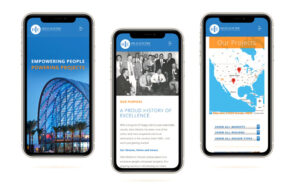
A mobile-optimized website is the foundation of the 2026 digital playbook, immediately showcasing brand history, mission, and geographical reach to potential clients.
Pillar 2: Mobile-First Design That Actually Works
Speed and mobile aren’t “nice features”—they’re deal-breakers.
Google punishes slow sites. In fact, in 2016, our CEO Les Kollegian was hired by Google to speak at their conferences about this exact issue. Here’s the stat that should terrify you: for every extra second your page takes to load, your bounce rate jumps 8X higher.
Think about that. One extra second. Eight times more people, gone.
If you don’t know how to optimize your site properly—and most don’t—you’re hemorrhaging traffic and conversions without even realizing it. And with over 70% of construction buyers starting their research on mobile, building for phones isn’t optional anymore. It’s fundamental.
Don’t get us wrong. Desktop design is EXTREMELY important. However, mobile-first in the A/E/C vertical is how all companies should be thinking. Once they’re evaluating a project or issuing a bid, your prospects are likely to switch to a larger screen to review PDFs, drawings, case studies, and detailed qualifications. A robust, desktop-friendly experience helps with credibility, downloads, and document access.
What matters:
Load time under 3 seconds. Period. Every second longer and you’re losing people.
Easy navigation for thumbs, not mouse cursors. Big buttons, smart spacing. Remember, your best trades might be on a job site wearing gloves. Your best prospect may be doing research while waiting for his/her cocktail at the bar.
Images that look great on small screens. Don’t sacrifice visual impact, but optimize everything so it loads fast.
Simple forms. Mobile users won’t fill out 15 fields. Keep it to name, email, phone, and project type.
Here’s a stat that should scare you: mobile users are 5 times more likely to abandon a site that isn’t optimized. You can’t afford to lose half your audience because your site looks bad on a phone.
The Bottom Line: If your site doesn’t work flawlessly on mobile, you’ve disqualified yourself from the majority of potential clients before they even see your work.
Practical guidance:
Start with a mobile-first design mindset:
Fast load times (optimized images, compressed videos, lean code).
Clear navigation with prominent project gallery, capabilities, and contact.
Accessible CTAs (Get a quote, Request a proposal, Call now).
Readable typography, concise copy, and scannable sections.
Construction is a relationship business–and trust is everything. Your website needs to prove you’re legitimate, capable, and reliable and yes… trustworthy—before someone picks up the phone.
Essential trust-builders:
Show your credentials. Certifications, licenses, insurance, safety records. Display logos from your suppliers and partners. Make it obvious you’re the real deal.
Sounds basic, right?
We’ve worked with companies doing $50 million+ in revenue who don’t do this. Their response? “We have enough business.”
Our response? Do you, though? Because “enough” isn’t the same as “all the business you could have.” What are you leaving on the table by making prospects guess whether you’re legit? Trust signals aren’t just for startups trying to prove themselves. They’re for every company that wants to convert more of the traffic they’re already getting.
Real testimonials with real details. “Saved us 15% on materials and finished two weeks early” beats “Great to work with!” every time. Use names, titles, photos if possible.
Introduce your team. People want to know who they’re hiring. Real photos of real people build connection.
Highlight your track record. OSHA ratings, safety certifications, project completion rates—these signal operational excellence.
Here’s why this matters: 47% of buyers look at 3-5 pieces of content before they’ll even talk to a salesperson. Make it easy for them to say yes by giving them the proof points they need.
The Bottom Line: Trust isn’t given, it’s earned. Your website should make it effortless for prospects to find the evidence they need to feel confident about working with you.
Pillar 4: Make It Stupid-Easy to Contact You
Every page should have a purpose. Every purpose should have a clear next step.
If someone’s interested, don’t make them hunt for how to reach you.
What converts:
Multiple ways to get in touch. “Request a Bid,” “Schedule a Consultation,” “Get an Estimate,” “Download Our Capabilities Deck.” Different people want different entry points.
Click-to-call on mobile. 61% of mobile users will call during the buying process. Make the phone number tappable everywhere.
Contact options that follow them. Sticky contact bars or chat widgets that stay visible as people scroll.
Forms right where they’re looking. Put inquiry forms directly on portfolio pages so prospects can reach out while viewing relevant work.
The math: you’re paying $165+ per lead from search ads. If your site doesn’t make it easy to convert, you’re wasting that investment.
Pro tip: Keep forms short. Name, email, phone, project type—that’s enough for a first conversation.
The Bottom Line: Every page needs a clear “do this next” moment. The easier you make it to contact you, the more qualified leads you’ll capture.
Pillar 5: Get Found by the Right People
A beautiful website is worthless if no one can find it.
The firms that dominate their markets don’t just build great sites—they make sure those sites show up when potential clients are searching.
The technical stuff (simplified):
Make sure your site is fast, clean, and organized in a way that search engines—and now AI—can understand. This includes things like clear page titles, good site structure, and behind-the-scenes code that helps Google, ChatGPT, Perplexity, and other AI tools figure out what you actually do.
Here’s why this matters more than ever: people aren’t just Googling anymore. They’re asking ChatGPT “who are the best commercial contractors in [city]?” or using AI search tools to compare firms. If your site isn’t structured properly, you won’t show up in those results—even if you’re the perfect fit. AI reads your site differently than humans do, and if it can’t parse your information clearly, you’re invisible in the fastest-growing search channel out there.
The content strategy:
Content marketing generates 54% more leads than traditional marketing. Adding a blog to your site increases your chances of ranking on Google by 434%.
Here’s what to create:
Service pages that match what people search for. Think “commercial general contractor in [your city]” or “design-build services in [your region].”
Project case studies with location details. Construction is local. Make sure every case study includes where the project was and what type of work it involved.
Educational content that answers questions. Blog posts like “How long does commercial construction permitting take?” or “What’s the difference between design-bid-build and design-build?” These attract people early in their research process.
The Bottom Line: SEO isn’t optional—it’s your primary lead source. Build it into your website from day one, target the searches your ideal clients are making, and create content that answers their questions. Do this right and your site becomes a lead-generating machine. And for those of you who don’t believe you are being found via search in any capacity. Aehhhhhhhh (buzzer sound). You have NO idea. At Jacob Tyler, we never thought in a million years that an executive at Sony would be upset with his current agency and “search” for another and find us. Being optimized for search got us that account and assistance developing the VAIO brand for Sony. So yeah, we believe. We will give you some more information on “search” in a little bit.
Design Trends That Actually Matter in 2026
Clean and Simple Wins
Less is more. White space, clean fonts, minimal navigation. Focus attention on what matters—your work.
Large Typography
Use of clean and modern typography in a large point type grabs attention and keeps it. Don’t overdo it though. Remember that people need to be attracted to read more and not yelled at.
Video Makes a Difference
Time-lapse build videos, drone footage, client testimonials. Video tells stories in ways photos can’t.
Dark Mode Is Here
Dark backgrounds with sharp contrast can make architectural work pop. It’s modern, striking, and effective. With that said, be careful to not have too much body copy in reverse (white on top of black) as it can make paragraph content more difficult to read.
Subtle Motion Adds Polish
Hover effects, scroll animations, interactive filters. Small details that make the experience feel premium without overwhelming users.
Sustainability Messaging Matters
Affiliations, green building practices, LEED certifications, energy-efficient outcomes—these resonate with commercial clients and conscious homeowners alike.
What a Professional Website Actually Costs
Let’s talk money. Here’s what you should expect to invest:
Small to Mid-Size Firms: $15,000 – $25,000
You get:
15-25 pages
Custom design that’s mobile-responsive
10-15 portfolio projects
Contact forms and lead capture
Basic search optimization
Timeline: 10-14 weeks
Best for: Local contractors, small commercial builders, residential remodelers
Mid-Size to Large Firms: $25,000 – $55,000+
You get:
30-50+ pages
Advanced functionality and design
25-50 portfolio projects with filtering
Integration with your CRM and project tools
Comprehensive SEO strategy
Blog and content marketing setup
Video integration
Timeline: 14-20 weeks
Best for: Regional general contractors, design-build firms, commercial construction companies
Enterprise-Level Firms: $55,000 – $100,000+
You get:
50-100+ pages
Fully custom everything
Multi-location support
Project portals and employee logins
Interactive maps and advanced showcases
Marketing automation
Ongoing optimization and testing
Timeline: 20-24+ weeks
Best for: National contractors, large commercial builders, industrial construction firms
Ongoing Maintenance: $1,500 – $3,000/month
Includes:
Security updates
New project additions
SEO monitoring
Performance optimization
Analytics reviews
Think of this as the cost of keeping your best salesperson sharp and effective. Keep in mind that most Websites as mentioned above can be developed in WordPress, which is infinitely scalable so even though you may start with 15 to 20 pages, you can add as many as you like, and it is super easy to do so.
Mistakes That Kill Conversions
Portfolio overload. Quality beats quantity. Show your best 15-25 projects, not every job you’ve done since 1985.
Ignoring mobile. If it doesn’t work on a phone, you’ve lost the lead. Period.
Hiding your call-to-action. Every page should answer: “What should I do next?” Make it obvious.
Treating SEO as an afterthought. 57% of B2B marketers say SEO generates more leads than anything else. Build it in from the start.
Slow load times. Users leave. Google penalizes. You lose.
No way to track results. If you can’t measure it, you can’t improve it. Set up tracking for form submissions, calls, and key pages.
Stale content. A portfolio that stops in 2019 signals a business that stopped growing. Update regularly.
How to Know If It’s Working
Track these numbers to measure your website’s impact:
Traffic growth (month-over-month and year-over-year)
Conversion rate (forms, calls, downloads as a % of visitors)
Bounce rate (target under 40% on key pages)
Time on site (longer = more engaged
Search rankings for your target terms
Leads generated (qualified inquiries)
Cost per lead (compared to other channels)
Projects won from web inquiries
The goal isn’t to hit industry averages—it’s to beat your own baseline. A 20% lift in traffic or a 0.5% bump in conversion rate translates directly to revenue.
Your 2026 Website Checklist
Use this when evaluating proposals or scoping your project:
Strategy & Planning
Audience personas defined
Competitor analysis completed
Keyword research done
Conversion goals established
Site structure approved
Design & Experience
Mobile-first, responsive design
Loads in under 3 seconds
Clean layouts with white space
High-quality, authentic photos (no stock)
Consistent branding throughout
Content & Messaging
Clear value proposition on homepage
Service pages optimized for search
10-20 featured projects with case studies
Client testimonials (text or video)
Team bios and photos
Trust signals visible (certifications, licenses)
Functionality
Contact forms on key pages
Click-to-call phone numbers
Filterable project portfolio
Blog/resources section
Secure hosting and backups
SEO & Analytics
Google Analytics installed
Search Console configured
Page titles and descriptions optimized
Sitemap submitted
Redirects set up (if redesign)
Post-Launch
Tested across all devices
Monthly analytics reporting
Content update plan in place
Ongoing optimization strategy defined
Common Questions Answered
How much should I really spend on a website?
For most construction companies, expect to invest $15,000 to $75,000+ depending on complexity and scale.
Think of it this way: if a well-designed site generates even 3-5 additional qualified leads per month, it pays for itself within months. The question isn’t “what’s the cheapest option?” It’s “what delivers the best return?”
How long does it take to build?
Quality takes time. Most projects run 10-16 weeks from kickoff to launch. Smaller sites might be done in 8-10 weeks. Enterprise sites with complex features can take 20-24 weeks.
Rushing usually means compromising quality. Launch something you’re proud of, not something you’re settling for.
Do I really need mobile optimization?
Absolutely. Over 70% of potential clients browse on mobile before making a decision. Google ranks your mobile site first. Mobile users are 5X more likely to bail on a site that doesn’t work properly.
If your site doesn’t work flawlessly on phones, you’re eliminating the majority of your market.
Can I just use a template?
Sure, if you want to blend in and hope for the best.
Template platforms like Wix or Squarespace are cheap upfront, but they come with hidden costs that kill your competitiveness. Here’s why they fall short for construction companies:
Speed kills your conversions. These platforms are bloated with code you don’t need. They’re slower out of the box, and you can’t optimize them the way a custom site can. Remember: every extra second costs you 8X more bounces.
You’re locked into their limitations. Need a custom project filtering system? Want to integrate with your CRM? Looking to build something unique that sets you apart? Good luck. Templates box you into what everyone else is doing.
SEO is hobbled from the start. Sure, they claim to be “SEO-friendly,” but you can’t control the technical foundation the way you need to. Your ability to rank for competitive local terms is significantly hampered compared to a properly built custom site.
You look like everyone else. Prospects can spot a Squarespace template from a mile away. When you’re competing for six- and seven-figure projects, looking like a DIY startup doesn’t inspire confidence.
AI can’t read it properly. These platforms generate messy code that makes it harder for AI search tools (ChatGPT, Perplexity, etc.) to understand and recommend your business. You’re invisible in the fastest-growing search channel.
Mobile experience is “good enough” at best. Remember that 70% of your prospects start on mobile? Template platforms give you a responsive site, but not an optimized one. There’s a massive difference.
The bottom line: when your average project is worth $50K to millions, a $200/year website isn’t a smart savings—it’s a costly compromise. Investing in a professional custom site delivers exponentially better ROI because it actually converts the traffic you’re working so hard to generate.
How often should I update it?
A website isn’t a “set it and forget it” asset. It’s a living business tool that needs regular attention to stay effective.
At minimum, add new projects quarterly. Fresh content tells both visitors and search engines you’re active and growing. But there’s more to it than that.
Why regular updates actually matter:
Search engines reward fresh content. Google prioritizes sites that consistently publish new material. A site that hasn’t been touched in six months gets buried, while competitors updating regularly climb the rankings. This isn’t theory—it’s how the algorithm works.
AI search needs current data. ChatGPT, Perplexity, and other AI tools pull from recently updated sources. If your site is static, you’re invisible in AI-powered search results—the fastest-growing way people find contractors.
Your prospects are watching. When someone lands on your site and sees your last project is from 2022, what do they think? Either you’re not busy (red flag) or you don’t care about your digital presence (also a red flag). Fresh content signals momentum and success.
SEO compounds over time. Every new blog post is another opportunity to rank for search terms. Every updated project page strengthens your local SEO. This isn’t busy work—it’s building equity that generates leads for years.
Ideal update cadence:
New blog posts monthly – drives SEO, answers buyer questions, positions you as an expert
Portfolio updates quarterly – keeps your best work front and center
Testimonials as you receive them – fresh social proof builds trust faster
Service pages refreshed annually – keeps messaging aligned with your current capabilities and market positioning
Technical SEO audit quarterly – ensures your site stays optimized as search algorithms evolve
Should you hire someone to manage this?
Unless you have a dedicated marketing person who understands SEO, content strategy, and technical optimization—yes, absolutely.
Here’s why: most construction company owners don’t have time to write optimized blog posts, resize images properly, update meta descriptions, monitor search rankings, or stay current on algorithm changes. And frankly, you shouldn’t. Your time is worth more managing projects and closing deals.
A monthly retainer with a specialized agency or freelancer ($1,500-$5,000/month depending on scope) typically includes:
Regular content creation and optimization
Portfolio and project page updates
SEO monitoring and adjustments
Technical performance optimization
Analytics reporting so you see what’s working
Think of it this way: if your site generates even 2-3 additional qualified leads per month because it’s consistently updated and optimized, that monthly investment has already paid for itself several times over.
The bottom line: A stale website signals a stale business. But more importantly, an outdated site actively costs you leads, rankings, and revenue. Regular updates aren’t optional maintenance—they’re how your website continues generating ROI long after launch.
What’s the difference between a brochure site and a lead generation site?
Brochure sites build trust and credibility through compelling storytelling, professional imagery, and showcases of your work. When designed thoughtfully, they serve as powerful digital portfolios that help potential clients understand who you are, what you do, and why they should work with you. For smaller businesses especially, a well-crafted brochure site with clear contact options and conversion points can be exactly what’s needed to turn visitors into leads.
Lead generation sites take this foundation further by prioritizing conversion at every turn—with multiple strategic calls-to-action, optimized user journeys, lead capture mechanisms throughout the experience, and content specifically designed to move visitors down the funnel.
Both approaches should ultimately drive leads and conversions. The difference is in emphasis: brochure sites lead with trust-building and storytelling, while lead generation sites lead with conversion optimization—but the best sites often blend elements of both.
We have plenty of business. Does SEO really matter?
Look, I get it. We hear this all the time: “We don’t need to worry about our website because we don’t get business from it anyway.”
But here’s the thing—comfort is the enemy of growth.
Think about it: why would you turn down the chance to be considered for projects you didn’t even know existed? Projects where the prospect finds you instead of you having to chase them down?
When we push back and ask “How do you actually know you’re not getting business from your site?”, there’s usually just crickets. Or worse, assumptions based on… well, nothing.
Here’s a story (in case you missed it earlier) that changed everything for us. Years ago, we won the brand development for Sony VAIO products for college students. Want to know how? A Sony senior executive (fed up with his current agency relationship) literally Googled agencies and found us. We didn’t even think that was possible. But it happened, and we became true believers.
Fast forward to 2025. We redesigned the website for Dempsey Construction. About three months after launch, Michaela Weibel, their Director of Marketing, called us—absolutely shocked. She’d been there over five years and had never received a single lead through their website. Not one.
With the new site and proper optimization? Leads started coming in.. and while just a few, it is certainly better than none. Now they’re actually in the game instead of watching from the sidelines. And get this—just one deal pays for the entire website investment and then some.
But it gets even better. At Jacob Tyler, we’re now landing clients through something most agencies aren’t even thinking about yet: generative search.
Sure, people still Google “Best Web Design Agencies in San Diego” or “Construction Web Designer”—and we show up for those. But recently, an executive asked Gemini (Google’s AI), “Who designed the Hensel Phelps website?” Because we optimized our site for generative search, they got the right answer: us. We won that client.
This is the new reality. In 2026, if you’re in construction and you’re not optimized for generative search—especially around your completed projects—you’re invisible to a massive chunk of potential clients.
Should I hire a construction specialist or a general agency?
Here’s our honest take, and we’d be lying if we told you otherwise: you don’t need an agency that only does construction.
We’ve been doing this for 25 years at Jacob Tyler. In that time, we’ve built high-performing websites for health and life sciences companies, medical product manufacturers, ecommerce brands, financial services firms, and yes—construction and industrial companies. The idea that an agency must be vertically niched to deliver results? That’s marketing spin, not reality.
What you actually need is this:
An agency that takes the time to deeply understand your buyers, your sales cycle, your competitive landscape, and what drives decisions in your market. Whether that’s construction, manufacturing, or healthcare doesn’t matter as much as their commitment to learning what makes your business tick.
That said, industry experience does accelerate results.
When an agency has worked with construction firms before, they come to the table knowing:
How to structure project portfolios that actually convert
Which trust signals matter most (certifications, safety records, bonding capacity)
How to optimize for the long, relationship-driven sales cycles typical in construction
What questions prospects ask before they’re ready to request a bid
The balance between showcasing capabilities and not overwhelming decision-makers
That expertise means faster onboarding, fewer missteps, and a site that performs from day one instead of needing months of trial and error.
But here’s what matters more than niche experience:
Does the agency have a track record of driving measurable results? Do they understand conversion optimization, SEO, user experience, and content strategy at a deep level? Can they point to specific outcomes—increased leads, higher rankings, improved conversion rates—across any B2B vertical?
Those fundamentals transcend industry. A team that’s driven results in financial services or life sciences can absolutely apply that same rigor and strategic thinking to construction. The principles of effective digital marketing don’t change just because the hard hats do.
The bottom line:
Choose an agency based on their strategic chops, their commitment to understanding your specific market, and their proven ability to deliver ROI—not just their client roster. Industry experience is a plus and can accelerate results, but it’s not a requirement. Deep expertise in digital strategy, combined with genuine curiosity about your business, will always outperform shallow “niche specialist” credentials.
At Jacob Tyler, we bring both: 25 years of cross-industry experience and a proven track record in construction and industrial markets. That combination means we know what works universally and what needs to be tailored specifically for how contractors buy.
How do I measure ROI?
First, let’s be clear about something: your website is a critical piece of your marketing engine, but it’s not the only piece.
We’d be doing you a disservice if we said “build a great website and watch the leads roll in.” That’s not how sustainable growth works. Your website needs to work in concert with your brand, your relationships, your presence at trade shows, your direct mail, your reputation in the community, and yes—even those conversations on the 19th hole.
That said, your website should absolutely be measured and held accountable for ROI.
Here’s what to track:
Qualified leads generated – how many serious inquiries came directly from the site
Conversion rate – percentage of visitors who take action (form fills, calls, downloads)
Revenue from web-sourced inquiries – actual project wins that started with your website
Cost per lead – compare what you’re spending on the website against other channels like trade shows, print ads, or pay-per-click
Most construction firms find that once their website is properly optimized, it delivers the lowest cost per qualified lead of any marketing channel. Even modest improvements—like a 1% conversion bump—can generate hundreds of thousands in additional project value annually.
But here’s the bigger picture:
Your website doesn’t exist in a vacuum. It’s the hub where all your other marketing efforts converge:
Someone meets you at a trade show → they Google you → your website seals the deal (or kills it)
A referral mentions your name → the prospect checks you out online → your site validates the recommendation
You run targeted ads → traffic lands on your site → conversion optimization determines if that spend pays off
Your brand shows up in their LinkedIn feed → they click through → your website tells the full story
Think of it this way: Your brand is your reputation. Your website is where that reputation gets verified and converted into action. Traditional marketing—networking, events, direct outreach—gets you in the conversation. Your digital presence determines whether that conversation becomes a contract.
So yes, measure your website’s performance religiously. But don’t forget that your entire marketing ecosystem—brand positioning, consistent messaging across channels, strategic relationship building, and traditional outreach—all work together to drive revenue.
The website is your best salesperson. But even the best salesperson needs leads to close. That’s where the rest of your marketing comes in.
Your Website Is Your Competitive Advantage
In 2026, your construction website isn’t a cost center. It’s a strategic asset that either generates revenue or bleeds opportunity.
The firms winning the best projects understand this: your website is a business development engine that works around the clock. While your competitors are still treating their online presence as an afterthought, the leaders in your market are converting browsers into bids—24/7, without a single sales call.
Here’s the math that matters: construction websites average around a 2% conversion rate. That means 98 out of 100 qualified prospects leave without contacting you.
Now imagine cutting that waste in half. Better mobile experience, faster load times, clearer calls-to-action, stronger portfolio presentation—these aren’t cosmetic upgrades. They’re the difference between doubling your lead volume and watching opportunities go to competitors who got the details right.
Combine that with smart SEO and a relentless commitment to showcasing your best work, and you’ve built something that compounds: a platform that gets stronger, ranks higher, and generates more qualified leads every month—without you spending another dollar on traffic.
For owners and marketing leaders evaluating partners, the criteria are simple: find an agency that understands how construction buyers make decisions, builds for conversion not just aesthetics, and measures results in leads and revenue, not likes and page views.
The investment in getting this right pays dividends for years. The cost of getting it wrong? You’re already paying it—you just don’t see the opportunities you’re missing.
Let’s Talk About What’s Possible
If you’ve made it this far, you already know your website could be working harder for you.
Maybe you’re frustrated watching leads go to competitors with slicker digital presence. Maybe you know your site doesn’t represent the quality of work you actually deliver. Or maybe you’re just tired of leaving money on the table because your online experience doesn’t match your reputation in the field.
We get it. We’ve spent 25 years helping companies in construction, industrial, and beyond turn their digital presence into a genuine competitive advantage—not just a prettier version of what everyone else has.
Here’s what we believe:
Your website should earn its keep. It should generate qualified leads, support your sales team, and prove ROI. If it’s not doing that, something’s broken—and it’s fixable.
You shouldn’t have to become a digital marketing expert to make this work. That’s what partners are for. Our job is to understand your business, your buyers, and your goals—then build something that delivers results you can measure.
If you’re ready to explore what’s possible, here’s how we typically start:
Have a real conversation. No sales pitch. No generic proposal. Just an honest discussion about where you are, where you want to be, and whether we’re the right fit to help you get there.
Build a plan that makes sense for your business. Not a one-size-fits-all template. A strategy tailored to your market, your goals, and your timeline.
Execute with accountability. We measure what matters—leads, conversions, revenue—and adjust as we learn what works best for your specific audience.
The firms that are winning in your market aren’t doing anything magical. They’re just committed to making their digital presence as strong as their craftsmanship. And they’re working with partners who understand that construction isn’t sold the same way software or sneakers are.
The best time to fix this was last year. The second best time? Right now.
If you’re curious about what’s possible for your business, let’s talk. No pressure, no pitch—just a conversation between people who care about building things that work.
Schedule a consultation or reach out and fill out our own lead form at www.jacobtyler.com. Hell… just call our CEO (Les Kollegian) directly at 619-379-0007. We’re here when you’re ready.
Mobile Landing Page Optimization: Best Practices
Did you know that 60% of online traffic comes from mobile devices? And here’s the kicker—if your landing page doesn’t work well on mobile, users will leave in seconds, costing you leads and sales. Mobile landing pages aren’t just a nice-to-have; they’re critical for your business’s success.
By following these ecommerce SEO best practices, businesses can improve user experience, increase conversions, and meet customer expectations.
Why Mobile Landing Page Optimization Matters
Mobile users behave differently than desktop users. They want fast, easy-to-use websites. If your landing page isn’t optimized for mobile, Google may penalize your site, which can hurt your traffic and rankings.
A good mobile landing page enhances user experience. This leads to higher conversion rates. Adding consistent logos and design elements also builds trust and strengthens your brand identity.
This guide offers strategies to improve mobile landing pages. It focuses on engaging users and following ecommerce best practices.
Understanding User Behavior on Mobile
Mobile users expect speed and simplicity. They want to find information quickly and easily.
Landing pages should load fast and include clear calls to action, like “Shop Now” or “Sign Up.” Businesses can improve the customer experience by using consistent logos and cohesive design styles.
These elements make users more likely to engage with your content. Tools like Adobe Photoshop can help create visually appealing designs.
How User Experience Affects Conversions
Good user experience (UX) is essential for mobile landing pages. People expect fast-loading pages and simple navigation.
Clear design helps visitors find the information they need. Adding well-labeled sections and intuitive menus makes this process even smoother. This improves the chances of users taking actions, like signing up or making a purchase.
Key Elements of a Great Mobile Landing Page
Simple and Clear Navigation
Navigation is one of the most important features of a mobile landing page. Mobile users often have limited time and expect to find what they’re looking for with minimal effort. If navigation is confusing or cluttered, users are likely to leave your page quickly.
To create effective navigation:
Use simple menus: Menus should be easy to locate and understand. For example, a collapsible hamburger menu at the top of the page keeps navigation accessible but unobtrusive. Label menu options clearly so users immediately know what they’ll find when they click.
Organize content logically: Group related information into sections and arrange them in an intuitive order. For instance, place key content like product details or calls to action at the top, and supplemental information like FAQs or testimonials further down.
Keep it minimalist: Avoid overwhelming users with too many links, images, or flashy design elements. Instead, focus on clean layouts that highlight the most important actions or information.
Clear navigation not only improves user experience but also increases the likelihood that visitors will stay on your page and take action.
Responsive Design Techniques
Responsive design is critical for ensuring that your mobile landing page looks and functions properly on all devices. Without it, users may experience distorted layouts, unreadable text, or poorly positioned buttons, leading to frustration and lost conversions.
Here are some essential responsive design techniques:
Flexible grids and layouts: Design your page to adapt automatically to different screen sizes. For example, text blocks and images should resize and reposition themselves to fit a smartphone’s narrow screen or a tablet’s wider display.
Add alt text for images: Alt text improves accessibility for visually impaired users and provides context for search engines, boosting your SEO. A clear description like “Close-up of our eco-friendly water bottle” can serve both purposes.
Test performance on multiple platforms: Platforms like WordPress often include responsive design tools or plugins, but always test your page manually on various devices. Make sure all elements load properly and remain easy to interact with.
By prioritizing responsive design, you can ensure that your landing page delivers a consistent experience across all devices, keeping users engaged no matter how they access your site.
Engaging, Mobile-Friendly Content
Content is the backbone of any landing page, and for mobile users, it needs to be especially clear and concise. Mobile screens are smaller, and users often skim rather than read every detail. Your content should get straight to the point while still being engaging.
Here’s how to create content that works for mobile:
Write concise and relevant content: Avoid long paragraphs or unnecessary information. For example, instead of a lengthy description of your company’s history, focus on the benefits of your product or service in short sentences.
Use clean URLs: Simplify your URLs to make them user-friendly and descriptive. A URL like “yourwebsite.com/mobile-landing-page” is clearer and more professional than “yourwebsite.com/page123.”
Add anchor text to guide users: Use links that help users navigate your page more efficiently. For example, include links like “Learn more about our pricing” or “View product features” to direct visitors to relevant sections without overwhelming them.
Conduct keyword research: Identify the terms your audience is searching for, such as “best mobile landing pages” or “responsive design tips,” and incorporate them naturally into your content. This improves visibility in search results and helps users find your page more easily.
By tailoring your content to mobile users, you can create a landing page that resonates with your audience and encourages them to take action.
Creating Strong Calls to Action
Actionable Buttons
Buttons play a big role in getting users to take action. Make sure your buttons:
Stand out with bold colors.
Use clear, action-focused text like “Sign Up Now.”
Are large enough to tap easily.
Are placed strategically for quick access.
A/B Testing
Test different button colors, text, and placements to see what works best. Testing reveals which designs resonate with your audience. This data can guide future decisions and improve conversions.
Using tools like a content delivery network can speed up loading times, ensuring a smoother user experience during testing.
Using Visuals to Improve Engagement
Choose the Right Images and Videos
Images and videos can grab attention and reduce bounce rates when used effectively.
Use vibrant colors: They help capture interest.
Optimize for performance: Lightweight visuals load faster and improve usability.
Keep Visuals Lightweight
Fast-loading visuals are essential for mobile users. Compress images and use lower-resolution videos to save space. This ensures pages load quickly and keeps users engaged.
Ensuring SEO Friendliness
Mobile-Specific Keywords
Use mobile-specific keywords and phrases to increase visibility. Terms like “mobile app” or “mission statement” align with what users search for.
Place anchor text in key areas to guide users to the right content and improve engagement.
Optimized Meta Tags
Meta tags and descriptions should clearly explain the value of your content. Tools like HubSpot can help refine your descriptions to attract clicks and improve mobile engagement.
Ready to Improve Your Mobile Landing Pages?
Mobile optimization is no longer optional—it’s essential. A well-optimized landing page creates a seamless experience for users and helps your business grow.
If you’re ready to take your mobile landing pages to the next level,partner with Jacob Tyler. With our expertise in responsive design and user experience, we can help you create mobile-friendly pages that drive results.
What is the Bounce Rate in Google Analytics?
Understanding the bounce rate is crucial for anyone managing a website. It reveals how often users visit a page and then leave without further interaction. This metric is essential for evaluating how engaging and relevant your web pages are.
Understanding Bounce Rate
If a visitor lands on a page and exits without clicking on any other page, it counts as a bounce. For example, if 100 people visit your homepage, and 60 leave without exploring further, the bounce rate for that page is 60%.
A high bounce rate can signal that users are not finding what they expect on your page. It might mean the content is not engaging, the site is difficult to navigate, or the page loads too slowly. However, a high bounce rate is not always a negative indicator. For instance, if a user finds the information they need on a single page, they might leave satisfied without needing further interaction.
How to Find Bounce Rate on Google Analytics (Universal Analytics)
To locate the bounce rate in Universal Analytics, follow these steps:
Log in to Google Analytics: Access your account!
Navigate to Audience Overview: On the left-hand side menu, go to “Audience” and then select “Overview.”
Locate Bounce Rate Data: In the Audience Overview report, you will see a section for bounce rate. This will display the percentage of single-page sessions.
Finding Bounce Rate in Google Analytics 4 (GA4)
Google Analytics 4 introduces some changes compared to Universal Analytics. Instead of bounce rate, GA4 focuses on ‘engaged sessions.’
To find engaged sessions in GA4:
Access GA4: Log in to your GA4 account and select your property.
Navigate to Reports: Click on “Reports” in the left-hand menu.
Check Engagement Metrics: Go to the “Engagement” section and look for “Engaged Sessions.”
An engaged session in GA4 is defined as a session where a user interacts with the site for at least 10 seconds or triggers an event, such as a click or scroll. This metric provides a more detailed view of user engagement than bounce rate alone.
How to Interpret Bounce Rate and Engaged Sessions
Understanding bounce rate and engaged sessions is crucial for assessing website performance. A high bounce rate in Universal Analytics might indicate that users are not finding what they need, leading them to leave quickly. However, this does not always mean the page is failing. It could be that the content is fulfilling the user’s needs, and they leave satisfied.
In GA4, engaged sessions offer a clearer picture of how users interact with your site. A session where users stay engaged for a longer period or interact with multiple elements is often a sign of a positive user experience. Analyzing these metrics together can help you identify whether users are engaging meaningfully with your content.
Improving Bounce Rate and Engagement
To reduce bounce rate and improve engagement, consider the following strategies:
Enhance Page Load Speed: Slow-loading pages can drive users away. Optimize images and minimize scripts to improve loading times.
Improve Content Quality: Ensure your content is relevant, engaging, and provides value to the reader. High-quality content encourages users to explore more pages.
Optimize Navigation: Make your site easy to navigate. Clear menus and links to related content can keep users engaged longer.
Use A/B Testing: Experiment with different designs and content to see what works best for your audience. A/B testing helps you make data-driven decisions.
Enhancing User Experience with Bounce Rate Insights
Understanding and managing bounce rate is key to improving your website’s performance. Tracking bounce rate in Universal Analytics and engaged sessions in GA4 provides valuable insights into user behavior, enabling you to make informed decisions to improve your site’s user experience. If you need further assistance with analyzing and improving your website’s metrics, contact Jacob Tyler today.
The Ultimate Guide to Technical SEO Audit Services
Having a website is only the beginning of a successful online presence. If search engines can’t properly access, interpret, or trust your website, it won’t rank—and your audience won’t find you. That’s where technical SEO comes into play.
A technical SEO audit ensures your website’s backend is fully optimized for search engine visibility, crawlability, performance, and user experience. Whether you run a small business website or a large-scale eCommerce platform, technical SEO is the foundation that supports your content, design, and marketing efforts.
This guide will walk you through what a technical SEO audit involves, why it’s critical to your digital strategy, what services to expect, and how to choose the right provider.
What Is Technical SEO?
Technical SEO refers to the process of optimizing a website’s infrastructure so search engines can effectively crawl and index its pages. It involves analyzing the behind-the-scenes elements of your website—things like page load speed, mobile usability, XML sitemaps, site architecture, and security protocols. Unlike on-page SEO, which focuses on content and keyword use, or off-page SEO, which deals with backlinks and external signals, technical SEO ensures your website meets the performance and accessibility standards that search engines value.
What Is a Technical SEO Audit?
A technical SEO audit is a detailed inspection of your website’s technical health from a search engine’s point of view. It uncovers issues that might be preventing your site from ranking and provides a roadmap for resolving them.
During an audit, SEO specialists or tools crawl and analyze your site to identify weaknesses in your structure, code, and performance. These issues may not be immediately obvious, but they can have a significant impact on how well your site performs in search results.
Core Areas Covered in a Technical SEO Audit
Crawlability and Indexability
Search engines use bots to crawl your website. If those bots run into barriers, they won’t be able to index your content properly. An audit will examine your robots.txt file, which tells search engines which pages they can or cannot access. It will also evaluate your XML sitemap to ensure it accurately lists your site’s URLs and that it is submitted to search engines like Google Search Console.
Additionally, the audit will check for issues such as noindex tags applied to important pages, incorrect canonical tags, duplicate content problems, and crawl errors. Ensuring that search engines can access and properly interpret your site is fundamental to SEO success.
Site Architecture and Internal Linking
A well-structured website helps both users and search engines navigate your content. A technical SEO audit will review your website’s hierarchy, URL structure, and internal linking strategy.
Pages should be logically grouped and easily accessible within a few clicks from the homepage. Internal linking should guide users to related content and distribute link equity throughout your site. A flat, clean architecture allows search engines to efficiently crawl all critical pages and ensures no valuable content is buried too deep.
Page Speed and Performance
Site speed is a confirmed ranking factor, and it plays a crucial role in user experience. A slow-loading site can increase bounce rates and decrease conversions.
An audit will test your website’s loading speed using tools such as Google PageSpeed Insights or Lighthouse. It will identify performance bottlenecks such as unoptimized images, large JavaScript or CSS files, excessive third-party scripts, server response times, and render-blocking resources. Recommendations may include image compression, code minification, browser caching, lazy loading, or a content delivery network (CDN).
Mobile Usability
With mobile-first indexing now the standard, your website must perform flawlessly on smartphones and tablets. A technical SEO audit will check for responsive design, viewport configuration, font size, button spacing, and load speed on mobile devices. Ensuring mobile usability is not only good for SEO but also crucial for overall user satisfaction.
HTTPS and Website Security
Google has made it clear that HTTPS is a ranking signal. Websites that aren’t secured with an SSL certificate risk being flagged as unsafe in browsers, which can deter users.
An audit will verify that your site has a valid SSL certificate and that all pages load securely without mixed content warnings. It will also ensure that all internal links point to the HTTPS versions of your URLs and that redirects are properly configured.
Structured Data and Schema Markup
Structured data helps search engines understand the context of your content and can enhance how your listings appear in search results through rich snippets. A technical SEO audit will evaluate your use of schema markup to identify opportunities for improvement.
Common types of structured data include product information, reviews, articles, events, and FAQs. Properly implemented schema can improve your visibility in the SERPs and increase click-through rates.
Redirects and Broken Links
Broken links create a poor user experience and disrupt search engine crawling. A comprehensive audit will identify broken internal and external links and suggest corrections. It will also review redirect chains and loops, ensuring that all redirects are efficient and preserve link equity.
Duplicate Content and Canonicalization
Duplicate content can dilute your SEO efforts and confuse search engines about which page to rank. An audit will uncover duplicate pages or near-duplicate variations and recommend the use of canonical tags to consolidate authority.
It will also flag issues like printer-friendly URLs, session IDs, or inconsistent trailing slashes that may result in unnecessary duplication.
Core Web Vitals
Google’s Core Web Vitals are a set of metrics that measure real-world user experience related to loading, interactivity, and visual stability. An audit will test your site’s Largest Contentful Paint (LCP), First Input Delay (FID), and Cumulative Layout Shift (CLS) scores and offer practical fixes for each.
Improving Core Web Vitals can have a direct impact on rankings and user engagement.
Benefits of a Technical SEO Audit
Performing a technical SEO audit brings long-term benefits that go beyond simple search rankings. These include:
Improved Search Engine Visibility: Removing technical barriers allows search engines to better understand and rank your content.
Higher Organic Traffic: Optimizing your site’s infrastructure makes it more attractive to search engines, increasing your chances of appearing for valuable queries.
Faster Website Performance: A technically optimized site loads faster, which leads to improved engagement and lower bounce rates.
Stronger User Experience: Resolving usability issues creates a smoother experience for visitors, which can lead to more time on site and higher conversions.
Increased Conversions: A technically sound site builds trust with both users and search engines, supporting your broader digital marketing goals.
Future-Proof SEO: Regular audits keep your website up to date with the latest algorithm changes and best practices, preventing future issues.
How to Choose the Right Technical SEO Audit Service Provider
Not all SEO providers deliver the same level of insight. When evaluating potential partners, consider the following:
Audit Scope and Depth: Ensure the service covers all major technical areas including crawlability, site speed, mobile usability, Core Web Vitals, structured data, and more.
Tools and Methodology: Look for providers who use trusted tools like Screaming Frog, Sitebulb, Ahrefs, SEMrush, or Google Search Console to perform their audits.
Experience and Transparency: Choose a provider that clearly explains their findings, presents prioritized action steps, and is available to walk through recommendations.
Post-Audit Support: Some providers offer only the audit, while others can assist with implementation. Determine whether you need a one-time audit or ongoing technical SEO support.
Value for Investment: The cheapest option isn’t always the best. Look for a provider that offers actionable insights, not just a templated checklist.
When Should You Conduct a Technical SEO Audit?
You don’t need to wait for traffic to decline to take action. Consider performing a technical SEO audit if:
You’re launching a new website or migrating to a new domain
You’ve noticed a drop in organic traffic or rankings
You’ve made major site changes or updates
It’s been six months or more since your last audit
You want to build a solid foundation before launching content or link-building strategies
Taking the Next Step
Technical SEO is the backbone of a successful SEO strategy. Without it, your content may go unnoticed, your pages may load too slowly, and your site may underperform in search—even if everything else is in place.
If you’re serious about improving your website’s performance, visibility, and long-term success, investing in a professional technical SEO audit is one of the smartest steps you can take. Our experienced team will evaluate your site from top to bottom, identify all critical technical issues, and provide a clear, customized action plan to help you reach your goals.
Contact us today to learn more about our technical SEO audit services and how we can help your website perform at its best.
5 Reasons Why Content Marketing Should be an Integral Part of Your B2B Marketing Strategy
Content marketing is one of the most effective ways for B2B brands to establish a strong online presence and reach out to potential customers—and it’s become a necessity for B2B brands. By creating and sharing valuable, relevant, and engaging content, B2B brands can build trust and credibility with their audience, generate leads, and ultimately, drive more sales. Let’s explore the benefits of content marketing for B2B brands in more detail:
Builds Brand Awareness
Creating high-quality and pertinent content that resonates with your target audience is an excellent way to increase your brand’s visibility and establish it as a thought leader in your industry. By consistently creating and sharing valuable content, you can attract and retain the attention of your target audience, which will help to increase brand awareness and recognition. It also gives you a chance to “speak” at length to your audience, educating them on your offering before they become a warm lead.
Pro Tip: Create a brand messaging guide to ensure your tone and messaging are consistent to get the most impact out of your content.Get in touchif you need help creating your brand messaging
Increases Website Traffic
By creating high-quality content that is optimized for search engines, you can attract more organic traffic to your website. Search engines reward websites that provide valuable and relevant content to their users. By incorporating keywords, optimizing headlines, and using meta descriptions, you will boost your website’s search engine rankings, attract more traffic, and ultimately, generate more leads.
Pro Tip: Chat GPT is all the rage right now—but be cautious when using AI generated content. Search engines like Google can detect fully AI-written content and can potentially rank it lower than human-written content. You can use AI to help get the structure of an article in place, but make sure you rewrite it in your brand’s voice
Generates Leads
One of the most significant benefits of content marketing for B2B brands—and really, the main benefit—is that it can generate leads. By creating valuable content that addresses the pain points and challenges of your target audience, you can attract potential customers who are searching for solutions to their problems. By capturing their contact information through gated content, such as whitepapers, webinars, or eBooks, B2B brands can generate high-quality leads that are more likely to convert.
Nurtures Leads
Content marketing isn’t just about generating leads—it’s about nurturing them too. By creating content that addresses the specific needs and pain points of your leads, you can build trust and credibility which will help move the leads down through the sales funnel. By providing relevant and valuable content at each stage of the buyer’s journey, B2B brands can nurture leads and build long-term relationships with their customers.
Pro Tip: Install a chat feature or a way for potential customers to easily reach out to you and get answers they are looking for. Allowing customers to reach out to you increases your chances of conversion by 14.6%
Improves Customer Retention
Content marketing is an effective tool for improving customer retention. B2B brands can build stronger relationships with their customers and encourage them to stay loyal through a consistent stream of valuable content. This ongoing education and support will help your customers achieve their goals and stay engaged with your brand.
The Bottom Line:
Content marketing is a powerful tool for B2B brands looking to establish a strong online presence, generate leads, and drive more sales. So, if you are a B2B brand looking to grow your business, content marketing is something you should consider—and Jacob Tyler can help.
Get in touch today to learn about how we can help your B2B brand boost its content marketing—and its sales.
9 Ways to Boost Your SEO
When was the last time you ventured past the first page of a Google search? Unless WebMD has freaked you out — along with the rest of us — and you’re clicking deeper and deeper to make sure your papercut won’t give you typhus, you probably just pop a question in the search bar and hit the first link that appears. If that’s the case, then you’re among the 75% of users who never dig beyond the first page of a search.
Which makes sense: People are lambasted with choices these days, and to avoid decision paralysis, our minds tend to scramble for a single answer. That’s why a menu with five dishes seems more svelte than a menu of five pages. If you’re a business, you want your site to be the first option on the menu. And the way to get there? Search engine optimization, or SEO. Here are nine SEO techniques that can help buoy your site to the top of the Google Machine.
Anticipate Why People Come to Your Site
Search engines are (to a large extent) in the business of finding answers for people. Type in “Best Wines to Buy,” and Google will list pages of wine shops and purchase options. Now type in “Awesome Vineyards 2021,” and you’ll get a spate of world’s-best-wineries sites and tour schedules. So ask yourself: What do you want people to do on your site? (Hire you? Apply for a job? Read your favorite recipe?) Tailor your content so that search engines identify which questions you’re answering and how their users will benefit from finding you.
Value Your UX
Enticing visitors to click through your site enhances your SEO, because Google recognizes that your pages are useful for its customers. So make your UX clear and navigable. Intersperse text with images and videos, chunk up your layouts with H1-H2-H3 header tags, and stay open to using white space (which calms the eye and makes content more readable). And never, under any circumstances, use popups. Just … no, people. No.
Prize Quality Over Quantity
To get noticed online, you’ll want to push out content optimized with keywords, but Google penalizes you for keyword stuffing, in part because the average Googler will stay on sites that feel timely and smart longer than they will on sites that read like a robot wrote them. Some studies also indicate that long-form articles (over 3,000 words) attract more traffic and shares than smaller articles (between 901–1,200 words). So feel free to blast on, but keep it fresh.
Optimize, Optimize, Optimize!
We all know writing with keywords optimizes your copy, but images can boost your SEO, as well. Images that are too large drag down a page’s loading time, so whenever possible, resize or compress them. Save photos as JPEGs and line art or text-heavy images as PNGs. And add in alt tags (or “alt attributes”) into the code on the back-end of those images, which helps browsers find your site and also satisfies a number of accessibility requirements.
Be the Strongest Link
SEO agencies will advise you to link your content to external articles, but don’t discount the value of internal links, either. If you audit your site’s information hierarchy, you may find that some pages are viewed more often than others. Linking the oft-viewed pages to less-viewed pages will flow traffic to those neglected child-pages, helping Google discover and crawl them. That, in turn, improves the SEO of your site as a whole.
Play Tag
Write title tags and meta descriptions in the back-end of your site. Title tags are the headings of a page, and meta descriptions are text that appear in a search below those headings. Imagine that you’re writing for the “Venues” page of a state park. “Venues | State Park” is the title tag, while your meta description should be phrased like a CTA. (“Rent our venues at your state park …”) Together, title tags and meta descriptions are behind-the-scenes heroes vying for Google’s attention when someone types in, “Where can I rent venues at my state park?”
Go Niche
Around 4.5 billion people currently have access to the internet, so how do you carve out your own space online? You find a niche. You like gardening, but so do millions of other people, so you focus on how to grow orchids in a cold climate. You love sports, but so do the rest of us, so your site covers the latest in chess boxing or underwater hockey. You — well, you get the point. Hone in on the thing that enough people care about but not enough people talk about and build your content strategy around providing answers in that space.
Jump in the Conversation
Remember how we said search engines find answers for people? As any SEO agency will tell you, the people with the answers are often referred to as “authorities.” You can establish your authority through blogging or linking to other authorities, but you can also find a Q&A site like Quora and answer questions there. Airing your opinion too often might get weird, but giving a real explanation now and again and linking back to your site — when it’s warranted — tells search engines that you’re a reliable source within the cosmos of information floating online.
Nab an Interview
We get it — convincing someone to interview you is about as easy as landing an interview at your dream job. (In other words, not very.) So you may as well start your hustle now, because interviews operate like SEO word-of-mouth and augment your site’s visibility. Email bloggers to see if they want to chat. Talk to your buddy’s buddy who’s got a podcast. Getting on the talk-circuit in your field is bound to happen if you plug away at it long enough.
Google is Goliath. But that Goliath would collapse if it didn’t get us the answers we need — otherwise, we’d hop over to competitors like Yahoo! or Bing. You can increase your chances of ranking in all these search engines if you follow the tips above, but think through the reason people are coming to your site in the first place. We’ve been in the game for a minute now, and we’ve learned at least one thing along the way: The ultimate optimization is being useful to your audience. Do that, and you’re halfway to being discovered.
It’s Time to Step Up Your SEO
Are we crazy or does it seem like people have forgotten about the value of great SEO and a sound SEO strategy? And if they haven’t altogether forgotten about it, it’s certainly near the bottom of their mandatory marketing tactics list. But the fact is, if you’re not consistently trying to win in SEO, you’re losing. So in the spirit of paying homage to the search engine gods we’ve got a three things you can do right now to step up your game.
1. Use Rich Snippets to Get More Information In Front of People Who Care
You know when you perform a Google search and you see results with just the standard page title, page description, and a URL? Kinda boring right? Who’d wanna click that 2008-looking link? No one. Well, grandma maybe. People are looking for more information in the search engine results page in order to decide what the best result to click is.
Rich snippets solve that by including information in your search results that make them stand out. Prices, ratings, categories, etc., are examples of info that can be displayed to help consumers make a decision.
Using structured data to mark up your site content allows Google to search it and display it with this additional context-adding data. Better context equals better information and that equals more clicks for your target consumers. It’s win-win here, folks.
The last thing anyone wants to do in the 21st century is wait around for a website to load. We know that no one is trying to make people wait on purpose. Most people don’t even know their site is super sloooooow and they didn’t think about it when they had it built back in 2001.
So what’s a good load time? Well, it depends on your business, but 25% of people will abandon your page after waiting for 4 seconds so it’s safe to be better than that.
How do you fix a slow site? Start by going to a speed audit site like Pingdom to see how your site fares. Take action based on the results. We can’t bore you with the details of reducing image sizes, caching, and better code (this blog would be way too long if we did), but we trust you can figure it out, or you can call us to do a site audit and recommended optimization program.
3. Make Better Content
This is stupidly simple: make content that your target audience will find valuable and the publish it often. What does your customer need from you? How do you solve a problem or add a benefit to their lives? How does your product work? What are FAQs around your product or category? These are all good pieces of content that fit the needs of your consumer. You should use SEO best practices but the power is in making and publishing the content so that it’s out getting out there in the world. If you build it (well), they will come. That sort of thing.
So why does good content matter?
When you make content, it shows up in search results. When it’s good content that people click and consume, it shows up higher in search results. The more spots you hold in the top results, the better. That sends a signal to consumers that says you’re worth looking into. Because your customers want to know about you and your product. They may not know your name yet, but that’s OK. If they find you through your content that’s sitting on the first page of their search results and you’ve added value to their experience, then congrats because you’re at the conversion five yard line.
Now stop reading blogs and go out and get your SEO on. Your customers and your bottom line will thank you.
We like writing these blog posts for you. If you have questions or comments just hit us up via email or on Facebook. We’d love to talk more.
That year-end marketing budget is worth more than you think.
‘Use it or lose it’ is the mantra of many organizations when it comes to year-end budgets. If you’re in charge of the budget, it should be more than just a mantra, it should be your battle cry.
For starters, not spending allocated funds this year could mean you won’t receive those dollars next year. It’s no secret that budget planning is rooted in what departments spent the previous year to achieve their goals. To avoid being shortchanged in 2017, come up with a plan to do something your marketing team may not have tried before – a new tactic that could generate leads, drive revenue or build greater brand awareness.
You may be thinking, “Okay, cool. So, what should we do?” When considering what to spend those clams on, think in terms of the objectives you didn’t get to do this year. Some examples to kick start the ideas include the following:
End-of-Year email campaign – Creating an end-of-year email campaign can drum up business fast for the New Year. Consider a 3 email “drip campaign” with a landing page featuring content that addresses common consumer problems. To gain access to the content, the recipient will need to provide a name and email – giving you the contact information of a potential lead. As far as content, provide some thought leadership in your market by offering a whitepaper, video or E-book that provides value about the solving the issues your customers face. As an additional option, use the email campaign to generate buzz around a New Year special offer if your business has a product or service that could benefit customers as they start the year with fresh new purchasing or technology budgets.
Blog Posts – Speaking of content, investing in some fresh content for your website is an affordable and smart thing to do with year-end dollars. Hire a writer or agency that specializes in targeted content that can position your company as an industry thought leader. This is a fast, low cost option that can happen BEFORE the ball drops on 2016.
SEO Audit – Are the keywords on your website hitting the mark? Work with a strategic agency partner that can help your business identify keywords that are relevant to your product or service. An SEO-focused writer can make sure those SEO keyword opportunities are woven through your website in a logical, cohesive way.
Social Media Advertising Campaign – There’s an art to doing a social media campaign the right way. Social media advertising has grown to the point that sponsoring ads is having a powerful effect on driving awareness and conversions. Post one of your best performing offer ads and then sponsor the ad on Facebook, Instagram or Twitter depending on where your customers engage the most. Follow this up by considering an ad re-targeting strategy. Have an experienced firm set up a targeted ad campaign for people who have visited your website. Your ad will show up in their social media feeds, ensuring your product or service is always top of mind. Statistics are showing that retargeting is the most successful form of social advertising right now and social media engagement continues to grow at a voracious rate.
Get your info out there – Everyone’s talking about infographics. Easy to share through social media channels, on your website or in a presentation, infographics are a powerful “at-a-glance” tool for describing how your business can solve customer challenges. Find a partner or designer who is not only skilled at creating a visually appealing campaign but also developing a concept or theme for the graphic. Your customers love infographics. Trust me!
When it comes to year-end budgets, the bottom line is don’t lose it! Find new, affordable and creative ways to raise awareness, generate leads and ultimately, close deals. If you’d like to learn more about the tactics listed above or discover other ways to get the most out of your marketing budget, reach out.
We love talking about this stuff.
Marketing in San Diego | Jacob Tyler
Microsites and Landing Pages: A Primer
Just about every business has a website – or at least should. But a website is not the only venue through which you can market your business on the web. The rise of online marketing and its various tactics have given birth to new forms of web engagement – including the microsite and landing page. Generally, both are an addendum to – or an extension of – an existing website, but each serve a particular function in guiding people along the buyer journey. Let’s take a look at the basics:
The Microsite:
What is it? A microsite is a lot like it sounds – a small, bare bones version of a traditional website. Comprised of no more than a few pages, microsites are built around a singular message (i.e., a new campaign, product or service offering).
What is its purpose? Microsites help to develop brand awareness around a particular product or service. By focusing on a simple and clear message, microsites cut through the clutter of a traditional website and allow potential customers to learn about a product or service in a quick, painless and easy to digest manner.
The Landing Page:
What is it? A simple, single page or form – usually hosted on an existing website – intended to drive a specific action.
What is its purpose? The landing page is singularly focused and intended to spur action (i.e. – download information, sign up for a free trial, subscribe to newsletter, etc.) and move a potential customer from awareness to consideration and eventually, purchase.
The Bottom Line:
Microsites and Landing Pages are great vehicles to enhance your marketing efforts and help drive sales. In some cases, they can even be utilized in place of a traditional website. Microsites and landing pages offer similar benefits, and determining the right solution for your efforts is entirely dependent on your needs.
Benefits of microsites and landing pages include:
• Quick deployment (3-4 weeks vs. 3-4 months for a traditional site)
• Can be used as a short-term solution for specific goals and programs
• Promotes a specific call to action (CTA)
• Build brand awareness organically
• Easy to measure campaign engagement
• Simple navigation
• Allows for direct interaction with a specific promotion or campaign
• Great medium to tell a brand story
Want more info on this topic? Fill out the form to the right and let’s chat!