The Web Design Evolution of Jacob Tyler: A Digital Timeline Spanning Two Decades

Well… we did it. We launched a new website. You know how the old business saying goes; “We’re our own worst client”. That’s true for many and very true for us. We seem to always put ourselves last in the “to-do list” pecking order. However, after months of work, back-and-forth, opinions, changes, and procrastination, we have created an experience that we feel works for us AND the people visiting. In other words, this is yet another Web design we are proud of. We (our team) have a saying that websites are like dog years—every year online is equivalent to seven years in technology evolution. It’s a playful metaphor that captures a serious truth about digital longevity in our rapidly changing industry. Yet despite this accelerated aging, both our own websites and those we create for clients have consistently defied the odds, averaging an impressive eight-year lifespan that speaks to thoughtful design and strategic planning.

Today, we’re taking a journey through our own digital evolution, examining how our website has transformed over the years and what these changes reveal about broader trends in web design, user behavior, and technological advancement.

Version 1: The Foundation Years (Early 2000s)

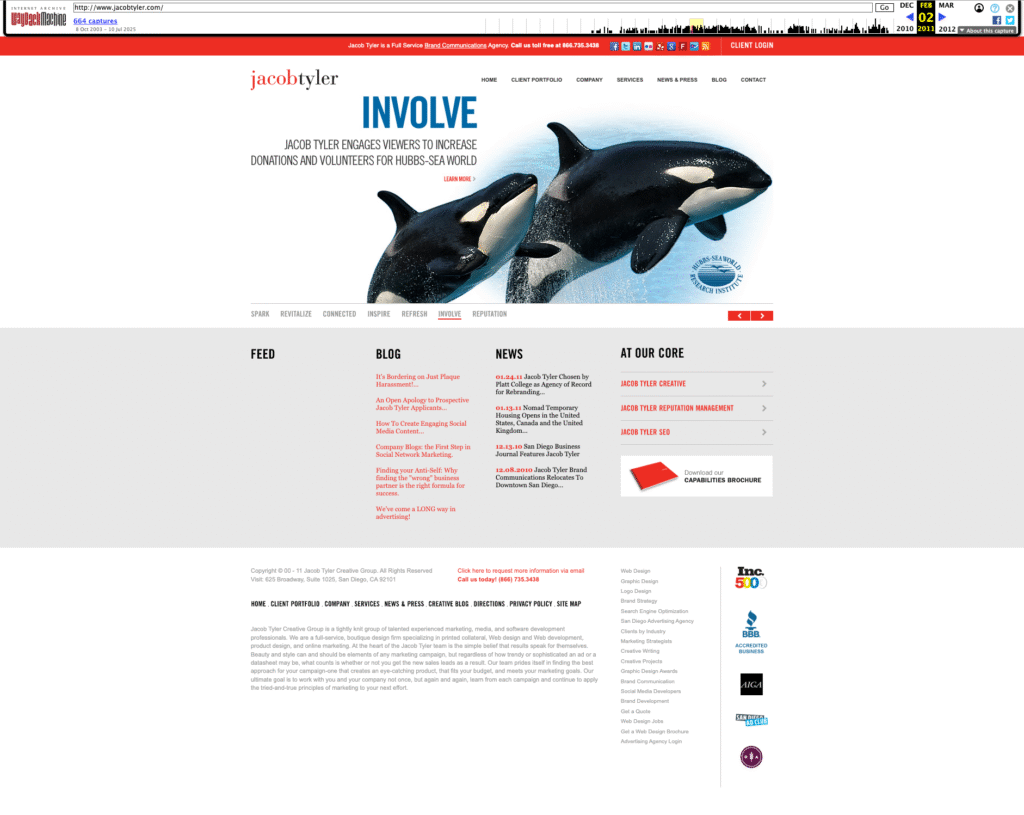
Our first website was a product of its time—clean, corporate, and information-focused. The design featured our signature red branding with a structured layout that prioritized content hierarchy and professional presentation. Navigation was straightforward, with clear sections for services, portfolio, and contact information.

This early iteration reflected the web standards of the early 2000s: fixed-width layouts, table-based structures, and a desktop-first mentality. Users were patient with longer load times and comfortable with scrolling through dense information.


Key characteristics of Version 1:

  • Static, information-rich design
  • Desktop-only optimization
  • Traditional corporate aesthetic
  • Content-heavy approach
  • Clear service differentiation

Version 2: The Interactive Revolution

Our second go-around was a total game-changer (at least to us). We ditched the static, corporate look and went big—think larger images, video content (super high-tech at the time), and interactive stuff that actually made people feel something when they landed on our site. Instead of just showing our work like a boring gallery, our case studies started telling real stories with visuals that packed a punch.

This was right when everyone was really getting overly obsessed with Facebook and Instagram (just getting started), and suddenly every brand needed to be a storyteller. So we flipped the script on how we presented our portfolio. Instead of just saying “Hey, look what we made,” we started showing “Here’s how our creative work actually moved the needle for our clients.” We stopped being an information dump and started creating experiences that people actually wanted to stick around for.

Notable improvements in Version 2:

  • Enhanced visual storytelling
  • Interactive portfolio elements and video
  • Stronger emotional connection
  • Social media integration
  • Results-focused case studies

Version 3: Mobile-First Thinking

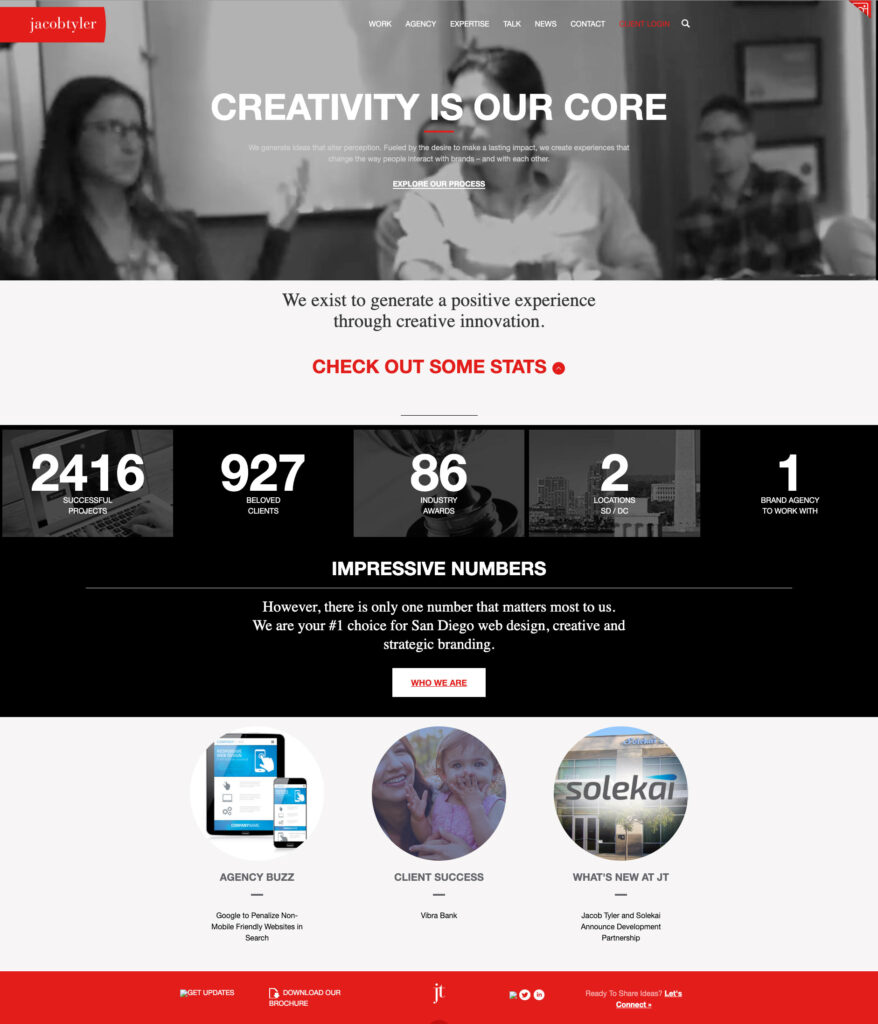
The third generation of our website represented our adaptation to the mobile revolution. As smartphones and tablets became ubiquitous, we redesigned with responsive principles at the core. The layout became more flexible, typography scaled appropriately across devices, and navigation transformed to accommodate touch interfaces. At the time, everyone was asking us who designed from mobile phones. And of course, this is extremely important however, a lot of companies that we work with, including us actually have less views on mobile platforms even to this day. That’s because in the business to business environment, many people are doing their research on their laptops and desktop devices.

Also, suddenly, scrolling became natural—people were swiping and scrolling with their thumbs all day long. Mobile screens were small, so longer pages made more sense than trying to cram everything into tiny viewports. That became the norm for desktop as well.

This was also when we started playing around with all the shiny new web tech and jumped on trends like parallax scrolling and those tiny animations that make everything feel more alive. We even spent some time wondering if we should design for the Apple Watch—yeah, that was a thing for about five minutes. Looking back, it’s a good reminder that just because something’s new and buzzy doesn’t mean you need to go all-in, but it’s still worth checking out to see if it’s actually useful or just another flash in the pan.

The mobile-first approach fundamentally changed how we structured content:

  • Responsive design principles
  • Touch-friendly navigation
  • Optimized loading speeds
  • Progressive enhancement
  • Cross-platform compatibility

Version 4: The Current Era – Bold, Creative, and Results-Driven

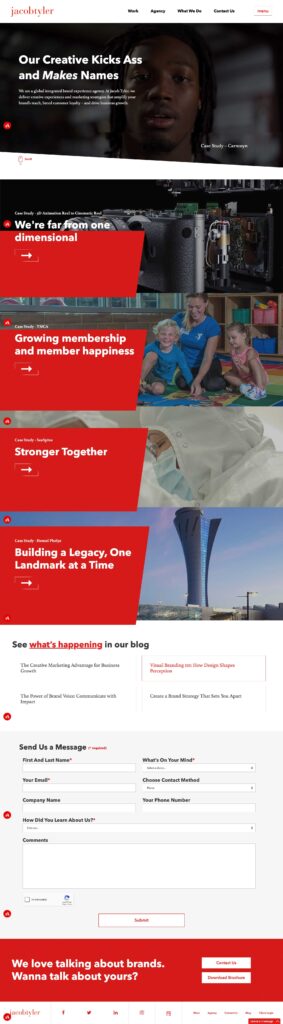
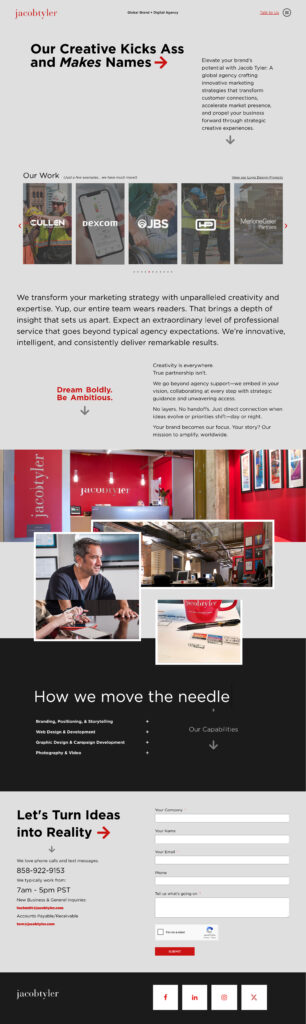
Our latest website embodies everything we’ve learned about effective digital experiences. The tagline “Our Creative Kicks Ass and Makes Names” was the only copy that stayed from the previous website because it immediately establishes our confident, results-oriented approach while maintaining the professional credibility our global clients expect.

The current design features:

  • Bold Visual Hierarchy: Large typography and strategic use of white space guide users through our story
  • Integrated Case Studies: Portfolio pieces are woven throughout the experience.
  • Multi-Device Optimization: Seamless experiences across desktop, tablet, and mobile devices
  • Performance Focus: Fast loading times and smooth interactions enhance user engagement
  • Conversion-Oriented: Strategic placement of contact forms and calls-to-action drive business results

The Importance of Strategic Redesign

Each evolution of our website wasn’t driven by boredom or aesthetic trends—it responded to fundamental shifts in user behavior, technology capabilities, and business objectives. This strategic approach to redesign offers several key benefits:

Technological Relevance

Keeping pace with web standards, security protocols, and performance expectations ensures your site remains functional and trustworthy.

User Experience Evolution

As user expectations change, websites must adapt to meet new interaction patterns and consumption preferences.

Brand Maturation

Your digital presence should evolve alongside your business, reflecting growth, expanded capabilities, and refined positioning.

Competitive Advantage

Regular updates help maintain differentiation in increasingly crowded markets.

Search Engine Optimization

Fresh content, improved site structure, and modern technical implementation boost search visibility.

Lessons from Our Journey

Our two-decade website evolution offers several insights for businesses considering their own digital transformation:

1. Plan for Longevity: While we joke about dog years, our eight-year average lifespan proves that thoughtful design and solid technical foundation can extend website value significantly.

2. Embrace Change Gradually: Each iteration built upon previous successes rather than starting from scratch, ensuring continuity while enabling innovation.

3. User-Centric Design Wins: Our most successful redesigns prioritized user needs over internal preferences or fleeting design trends. This applies for our clients as well.

4. Technology Should Enable, Not Drive: We adopted new technologies when they enhanced user experience, not simply because they existed.

5. Content Strategy Matters: Effective websites balance engaging presentation with substantial, valuable content that serves user intent.

Looking Forward

As we continue evolving our online presence, we’re already anticipating the next wave of changes: voice interfaces, AI-powered personalization, generative search, and immersive technologies that will reshape how users interact with brands online.

But regardless of technological advancement, our core philosophy remains constant: create experiences that connect with users, drive business results, and stand the test of time. After all, in an industry where dog years apply, longevity is the ultimate measure of success.

The Jacob Tyler website journey demonstrates that strategic redesign isn’t about chasing trends—it’s about thoughtfully evolving to serve users better while achieving business objectives. Whether you’re considering your first major redesign or your fourth, remember that the best websites aren’t just built to impress today’s visitors, but to adapt and thrive for years to come.

Ready to discuss how your website design can evolve to meet changing user expectations and business goals? Let’s start that conversation.

2020 Website & ADA Compliance Common Asked Questions…

Web accessibility is the practice of ensuring there are no barriers that prevent interaction with, or access to, Websites by people with physical disabilities, situational disabilities, and socio-economic restrictions on bandwidth and speed. When sites are correctly designed, developed and edited, generally all users have equal access to information and functionality.

In 2020 Jacob Tyler, in partnership with AccessiBe, released our automated platform JADA in order to quickly assist our clients Website compliance issues.

Jacob-Tyler-ADA-Compliance-Screenshot

Below are our frequently asked platform questions. If you would like to learn more or receive a product demonstration, please reach out to Jeff Tompkins at jeff@jacobtyler.com

How do the disabled use the internet?

People with various disabilities have tools that help them interact with sites. For the blind, there are screen readers which allow them to hear the content on a webpage. For those with motor impairments, adjustments are made so they can navigate websites using only the TAB key or other special implementations. Other adjustments can be as simple as increasing the font-size or adjusting contrast. Our tool allows anyone with any disability to adjust the settings to their hearts’ content until they’re browsing in comfort.

Why do I have to be compliant?

Web accessibility compliance is a requirement that’s been set by the ADA title III and affirmed by the DOJ. Moreover, legal implications aside, people living with disabilities make up between 20-25% of the global population. This is an enormous market that shouldn’t be cut out of the internet age, and opening up your business to such a large new audience should be beneficial for all.

I tried checking your compliance/compliance via wave/lighthouse/etc and got a whole bunch of errors, why am I not compliant?

First of all, testing for accessibility compliance is done by an accessibility expert and is called an audit. Automated tests are nowhere near being accurate in general. Also, they evaluate your template’s accessibility, whereas JADA doesn’t work on your template. It works on the session.

Still, if you want to test your website by yourself with such tools while using JADA, you can try Wave’s Chrome extension or Google Lighthouse, as they also work on the session. You’ll need to turn on “Accessible Mode” because JADA won’t change anything to your site by default, only when asked to. Our system makes session-based adjustments, catered specifically to the person’s disability and needed adjustments.

Again, I must emphasize that this is not a proper way to check accessibility and these tools often even present false information in order to motivate you to purchase their  remediation solution.

In addition, to help you optimize the results using the aforementioned tools, simply look at the errors you are receiving, make adjustments using JADA accordingly, and then run the test again. Given that this is not the proper way to check, whatever result you receive with this method is the best we can do!

Do we need to put in Alt tags and ARIA labels manually?

No, absolutely not! Our AI technology is not only able to identify characters and words, but also to understand context and recognize images, so it’s capable of taking care of all these labels and tags automatically.

What if I already put ALTs or did accessibility work?

That’s great! If you’ve already made changes to make your site more accessible, such as adding ALT tags, our AI will not override your work, as we assume you’ve made those changes for a good reason.

Why is your service so inexpensive? Sounds too good to be true!

In the web accessibility market, most solutions require manual remediation, which entails lots of time and effort of skilled developers and accessibility experts and is very expensive. Our AI cuts out all of that cost by automating the entire analysis and remediation process.

How long from the time Jacob Tyler implements the code until I’m compliant?

This can take up to 48 hours; you’ll see the interface immediately after installation and that solves about 30% of the requirements, but you won’t be fully compliant until up to 48 hours later when you also receive your statement of accessibility that doubles as a certificate of performance. You’ll receive that statement directly to your registered email at the moment you become compliant.

Is there anything that’s not included in the price?

There is one exception to our solution.  JADA remediates everything in your codebase, but there are certain elements that aren’t included in the code, like PDFs, videos, and documents (word, excel, ppt) so JADA can’t reach them. Nevertheless, if you have such elements on your site we do offer manual remediation for them, just like other manual services.

Can I have all my subdomains under one subscription/how do you handle subdomains?

We license every domain and subdomain separately. You can have several subdomains under one account, but you need a separate subscription per subdomain. If you have 10 or more subdomains, contact your partnerships manager to understand how best to handle this.

How do you compare to manual entry to your service?

Our competitors have fine solutions, but most provide a manual service. JADA is the only completely automated solution on the market providing full compliance with the WCAG 2.1. Manual remediation is a long process and requires the employment of skilled developers, which is very expensive and doesn’t include the necessary ongoing maintenance. JADA, on the other hand, was developed to be affordable and even scans sites every 24 hours in order to maintain compliance at all times.

Do you indemnify?

In the United States, anyone can be sued for any reason. We cannot prevent someone from suing you, nor can we indemnify you. We do have an intricate process through which we protect thousands of clients from litigation. Would you like me to explain it? Once you have installed JADA, your site will display an accessibility icon, which heads off 90%+ of lawsuits at the pass. If and when someone does approach you with a lawsuit or demand letter, our Accessibility Statement explains the changes that have been made to ensure your site is accessible. This statement can be sent to any legal entity or anyone else who needs clarification on the accessibility level of your site. Finally, in the rare instance that a legal entity has a specific complaint about your site, we have an effective process to handle these, called the Litigation Support Package.

What are the relationships between WCAG, ADA, Section 508 etc? What do I have to abide by?

The W3C (World Wide Web Consortium) issued the WCAG (Web Content Accessibility Guidelines). Thereafter, several governments adopted these guidelines into their legislations. Section 508 refers to public companies and government agencies, and directly references the WCAG as the accepted standard in the industry. ADA Title III is relevant for the private sector and refers to accessibility of public spaces. In 2018, the DOJ ruled that websites constitute public accommodations and are required to be equally accessible to people with disabilities. As a result, rulings have consistently cited the WCAG as the accepted standard in the industry. Therefore, if you abide by the WCAG you’re as compliant as possible.

I want more information on those laws, tell me more!

I will start in chronological order so you get a proper understanding of the chronological events that have led to web accessibility:  ADA – The Americans with disabilities act became law in 1990 and protects people with disabilities against discrimination.  Title III of the ADA refers to accessibility of public accommodations such as stores, restaurants, Hotels, etc..  Section 508 is part of the Rehabilitation Act and was passed in 1998. It requires federal agencies to develop, procure, and use information and communications technology that is accessible to people with disabilities.  W3C is the World Wide Web Consortium that developed the WCAG. WCAG 1.0 2.0 2.1 – The web content accessibility guidelines were initially released in 1999, but it wasn’t until 2018 that the DOJ regarded websites as public accommodations. This, in turn, expedited the process of governments adopting the WCAG as the standard to make websites accessible. There are 3 levels of accessibility stated in the WCAG – A, AA, AAA The WCAG 2.1 considers AA as the standard of an accessible website.

How can you prove we’re compliant, do you do an audit?

Our technology scans your entire website for problems and remediates them on the spot. We provide each website using JADA with a Statement of Accessibility that doubles as a certificate of performance and describes all the adjustment made to the site. We also use JADA ACE, our Automated Compliance Expert, to perform a full scan and 15-page downloadable pdf report.

If I get sued, what do you do to help?

If a licensee receives a demand letter and contacts us for assistance, we go through the following process. First, we perform a compliance audit along with two scans: aCe and WAVE. We use two scans because aCe is our own, so a third-party scanner concurring with our results is an added assurance. We will then provide our Accessibility Statement, along with our Suggested Response (a form letter we have used to great effect). We will include with this your Purchase Invoice, a Compliance Overview (to explain to the other party how our tool functions and so on), and a Failures Request Master. The Failures Request Master is a spreadsheet in which a complainant can log and document specific perceived accessibility failures or holes and request review of them. In the vast majority of cases, our licensees do not even receive a response to the Suggested Response.

Do you provide an itemized list or dashboard of accessibility where I can track everything on my site to see if it’s accessible?

We have our own scanner, called ACE (the Automated Compliance Expert) which provides 15-page PDF accessibility reports with relevant code snippets showing accessible and inaccessible elements.

Why can’t you ensure 100% compliance with your solution?

In the vast majority of cases, JADA functions perfectly from the moment of installation. In far less than 1% of cases, coding errors on a site’s source could cause the AI engines to misidentify or not identify various elements, which could lead to accessibility holes. As JADA has no ability to change a site’s source code, it would not be able to correct for this error. That error would, however pop up on an aCe scan, which would inform the site owner of the relevant issue.

Does JADA work on any CMS/system/website?

Yes, JADA can function on any domain capable of accepting Javascript code.

How Do I Check My Site’s Accessibility Level?

While you can of course check sites manually, we have developed a state-of-the-art Automated Compliance Expert, JADA ACE, to check everything in seconds. Just go to ace.accessibe.com and enter the domain you’d like to test in the search bar. You’ll see a full report ready in seconds that will be immediately available as a PDF via email.

What Is A Screen Reader?

A screen reader is a device or piece of software used by people with severe visual impairments or blindness to interact with a computer. Because screen reader users cannot effectively see, the screen reader is designed to “read out” the contents of a website so that they can use it. Some screen readers are physical devices that display the content of a website as braille text, while others are only software and verbally communicate content to the user. Screen readers generally need to be active from the moment the user has activated their computer, because they simply would not be able to operate the computer with a mouse for obvious reasons. While the vast majority of screen reader users are those with either no vision or impaired vision, screen readers are also important for the illiterate and people with certain learning and cognitive disabilities. An example of this would be someone with severe dyslexia who has trouble reading.

How does your AI work?

Our AI scans your entire website and compares its components, widgets, structures and user behavior to thousands of other sites already using our solution. Then, it finds out each and every element’s role. For example, It’ll understand your menus, dropdowns, popups, forms, validations, and all other aspects. Next, it will apply and modify your website’s behavior and HTML code on the fly, when users turn “Accessible Mode” on. It even scans all the images on your site and takes them through object recognition, as well as OCR processes in order to provide ALT tags to the images.

What is the advantage of using JADA’s technology vs. manual remediation?

There are many. A few of the big advantages are: analysis and re-remediation every 24 hours so you always stay compliant, no manual work from the customer side, no need to compromise the site UI or design, websites can be made fully accessible in 48 hours, we provide you with a certification of performance, and of course pricing is significantly more reasonable. How can I be sure your technology will remain compliant, do you check for bugs and update regularly?

We are constantly reviewing the latest updates in regards to web accessibility and implementing them to ensure our clients remain compliant. In addition, our AI rescans each website every 24 hours to keep current with any updates to the site!

Do you collect any data/affect GDPR?

What about GA (google analytics) data? We do not collect any data that would affect your GDPR compliance.

How do you handle i-Frames? If i have content coming from elsewhere can you remediate it?

Because i-frames are not actually code belonging to the domain that JADA is installed on,  JADA cannot affect them.

That being said, it is our understanding that it is the responsibility of the owner of the original content the i-frame draws from to make it compliant.

If you have content that is i-framed out on other domains, and JADA is installed in your code, your i-frame will be accessible.

Will your tool slow down my website or affect the regular UI/UX at all?

No, JADA is a session-based tool that adjusts the website on the fly after it’s been fully loaded and rendered. There will be no difference in browsing experience for someone who has not activated any accessibility features.

Do you affect our codebase at all?

No, there’s just a single line of JS code that needs to be implemented in the body of the site, that’s all.

Do you use Cookies?

No, we use local storage that is on the user side, not the server side, which enables us to function without affecting GDPR or storing any user data.

What is Local Storage Local storage is the storage of data on a user’s browser, so as not to transmit personal data.

Can JADA work on a password-protected site?

Yes, JADA works on the session therefore it can work on anything the user has access to. We have what is called a “lazy process” that is deployed after the user enters the password-protected section.

What’s the company policy in terms of data security?

We take data security very seriously, our infrastructure is in San Francisco and managed by Digital Ocean, we have an entire DevOps team dedicated to this issue. On a regular basis, they make attempts to hack the system and otherwise test it in order to ensure the highest level of ongoing security.

How do you trigger accessibility on Mobile Devices?

Just like having a screen reader for a website, a blind person uses assistive technology on their phone at all times. In order to listen to an announcement of a highlighted feature, the user taps one time. To activate that feature the user taps twice. When navigating through a website using a keyboard, the user will use TAB to move forward and Shift + TAB to move backwards throughout the page. For a touchscreen device a user will swipe right to navigate forwards and swipe left to navigate backwards. When using a website that has JADA, you immediately get an announcement to the assistive technology software stating that this website has accessibility adjustments. The user will swipe right and then tap twice in order to activate the screen reader adjustments.

What is an Alt Attribute and why does it matter for accessibility?

An alt attribute is text meant to be displayed in place of media, usually an image. The text is meant to explain or describe the image in the case that it cannot be properly rendered, or in the case of people using screen readers. Without alt attributes, images would not have any text describing them and people might just be told by a screen reader that they are navigating past an image, with no description. This is of course not acceptable, and part of why alt attributes are so important.

What are ARIA labels and why do they matter for accessibility?

ARIA labels are important for accessibility purposes because they label otherwise anonymous html elements. For instance, most people would think there’s no need to label a Facebook or Instagram link/icon because the shape is universally recognizable. That may be true for people who can see. For those who cannot, ARIA labels are needed to describe these icons and elements via a screen reader.

What Laws Do I Need To Comply With?

The ADA, the Rehabilitation Act and other laws exist in the United States to protect the rights of people with disabilities. While there has been debate in recent years as to specific statutes and whether they can be applied to websites, this was all clarified as of 2018 by the Department of Justice (DOJ).

While Section 508 of the Rehabilitation Act states that websites must be accessible according to the WCAG, it only applies to government agencies and the large public corporations that work with them. The WCAG, or Web Content Accessibility Guidelines, are developed by the World Wide Web Consortium (W3C) and are the only internationally recognized set of guidelines for web accessibility. The ADA, however, did not say anything at all about websites, and so people began filing suits related to web accessibility because it was clearly in the spirit of the law, but not the text, that websites should be accessible.

After thousands of these suits had been filed, the DOJ had to make a ruling on the issue. The DOJ stated then that all business websites are considered “places of public accommodations” and therefore must be made accessible to people with disabilities. It’s no different in principle from handicapped parking spaces and restrooms.

While the ADA still doesn’t have WCAG guidelines written into the text explicitly, every US court ruling on this issue, and every plaintiff bringing web accessibility complaints, ask for remediation based on the WCAG.

Outside the United States, there are laws ranging from AODA in Canada to EN 301549 in the EU that stipulate WCAG compliance in order to provide web accessibility. WCAG compliance at the AA level or higher is the best way to ensure that all people regardless of disability can use your website.

Browser Compatibility?

JADA functions with no problems on all modern browsers. You can feel free to use Safari, Firefox, Chrome or any other browser you’d like.
Jacob Tyler Wins Gold!

Congratulations to Richard Truss for submitting his Fireside Restaurant Ad in the 2020 Graphis Advertising Competition! We always knew the ad was awesome!!

Jacob Tyler wins gold in Graphis 2020 Advertising Competition

Jacob Tyler was ranked as a top 10 agency globally…

WASHINGTON, D.C., May 30, 2019 – Clutch officially announced its list of the top creative and marketing agencies for a variety of categories, based on their industry leadership, creative and marketing expertise, and client feedback.

“The marketing and creative sectors are increasingly adopting a digital-first mentality,” said Clutch Senior Business Analyst Sara Philibotte. “The best agencies must effectively incorporate creative strategy with the most cutting-edge technologies. These agencies have proven their ability to excel as versatile and adaptive leaders in this new market.”

Jacob Tyler was ranked as a top 10 agency globally for Social, Print, TV, Out of Home (OOH), and Radio advertising. As well, Jacob Tyler is in the top 25 of the Clutch branding firms out of 20,000 branding agencies listed on the Clutch platform.

Clutch’s research is ongoing and rankings are dynamic. The Clutch team invites interested companies to apply to get listed in the report next year.

The results are a snapshot of Clutch’s Leaders Matrices on Thursday, May 16, 2019. Rankings are dynamic and may not reflect the rankings currently listed on Clutch’s website.


About Clutch

A B2B research, ratings, and reviews firm in the heart of Washington, D.C., Clutch connects small and medium businesses with the best-fit agencies, software, or consultants they need to tackle business challenges together and with confidence. Clutch’s methodology compares business service providers and software in a specific market based on verified client reviews, services offered, work quality, and market presences.

About Jacob Tyler

Founded in 2000, Jacob Tyler is an award-winning Brand and Digital Agency with headquarters in San Diego California. Jacob Tyler focuses on helping companies grow through effective brand development and communication strategies that increase client revenue. The company specializes in developing unique experiences that attract, engage, and convert new customers to its clients’ business – pairing inventive creative with proven digital strategies to build brand campaigns that work. Over the last two decades, Jacob Tyler has worked with hundreds of different clients across a variety of industries, including hospitality, health/life sciences, consumer goods, financial services, education, and technology. Jacob Tyler’s roster of clients includes Novartis, Princeton Identity, YMCA, Hensel Phelps, and more. For more information, visit www.jacobtyler.com.

Pet-Friendly Offices Are Simply Better…It’s Science!

Bring your dog to work day has become much more than an annual excuse to boost company morale, it’s become a regular occurrence at companies across the globe, and for good reason. Having our fur babies trotting through the hallways, snoring through meetings and barking at the FedEx guy greatly impacts our work day happiness and it’s backed by scientific research.

office1

The three biggest benefits to a pet-friendly office are:

1. Boosting Creativity

Getting employees up and moving more often stimulates the brain and can help to increase creative ideation. Utilizing small breaks can also have the opposite effect, in a positive way, as it allows the brain a chance to rest and charge up for what’s next on the list. In a creative environment, anything that can help to boost creativity is not only good for the employees, but also for the clients who reap the benefits of a sharp, creative team. A study published in the Journal of Experimental Psychology found going for a walk can boost creative thinking by as much as 60% compared to staring at a screen.

2. Increased Bonding In the Humans

Whether it’s the snorts of a bulldog during a status meeting or the endless attempts of a developer to get the snarky chihuahua to like him, we all benefit from a few more laughs in our day. The work we do is important, yes, but also important is the time that we spend with our co-workers. Our furry friends can be a conduit to learning more about the person sitting next to you. A study from Central Michigan University found that dogs in the office can lead to better collaboration between co-workers.

3. Lower Stress

We can all benefit for a little less stress. Whether it’s the impending doom of a huge deadline or the fifteenth shade of blue the client has rejected for the new logo, we all suffer from work related stress. If giving a 30 second head rub to one of our canine buddies can decrease that stress, why not take advantage of it. The simple act of petting a dog has been verified as a way to increase oxytocin and increase employee smiles.

office2office3

At Jacob Tyler, we know that great work comes from a great environment. By challenging the norms of a typical office environment, we are able to push our work and ourselves further. Having some of our greatest fans sitting on our laps just makes the journey a little better.

Jacob Tyler in San Diego

On the Twelfth Day of Creative: Our Team

As told by our CEO, Les Kollegian…

On the Twelfth Day of Creative, I’m both joyful and thankful for all that Jacob Tyler has done this past year. After some VERY big changes and a major transition to a new office in the beginning of the year, we have managed to build our team and frankly, I feel our culture is the BEST it has ever been. We love the work we are doing for our clients and it shows. How can I tell? It’s not just the awards and the type of work we are doing… it’s the fact that our client retention and satisfaction is ALSO the best it has ever been. Our clients keep coming back for more and we are all thrilled.

Photo on 12-15-15 at 3.25 PM

I would love to say there is one project I am particularly proud of, but I take pride in my team and all the projects we do. I appreciate everyone who contributes to accomplish our goals and the 100% you bring every day to create success for our clients, and us.

Thank you all and have a GREAT and happy holiday.

885099_10153399986218507_1862117370900024544_o

7 Brand Launch Rules For Start Ups

Over the last few of years, San Diego has experienced a significant rise in startup companies. In one six month period last year, 228 companies formed in the area! To those of us who live here in America’s Finest City, this is not a surprise. San Diego’s weather might not be dynamic, but its creative energy most certainly is. Over the last 15 years, Jacob Tyler has helped launch countless brands – many of them startups. We’ve learned a few things along the way. Launching a brand is an exciting endeavor. But like a rocket, you only get one shot. The following seven tips will help you ensure your startup doesn’t crash and burn at launch.

Identify your audience, and find out everything you can about it. Before you launch a brand, it’s important to determine the audience for your product or service. Know who they are, what they want and how to best communicate to them.

If your name doesn’t say what you do, make sure your tagline or logo does. Not every company name is descriptive of its operations – and that’s OK. But a succinct tagline or a descriptive logo can capture a brand’s story and communicate in a glance.

Highlight your differentiation. It’s a simple but too often missed rule. Unless you’ve created something so unique that no one else does it, you have competition in your market. Make sure your branding and marketing efforts highlight what you do differently and why you do it better.

Tell your story. Why does your brand exist? Make sure your brand has a story that defines the motivations for your existence. A brand story will help humanize your brand and create a connection with your audience.

Be clear. Being a new brand means no one has ever heard of you. When you catch the attention of your audience, use it wisely. Have a clean and concise message about what you do and why you do it best. Create messaging that people will share via word of mouth. This form of grassroots marketing is incredibly powerful. Companies like Uber were able to explode and a global level in large part due to word of mouth.

Your launch never stops. There is no defined period for launching a brand. Unless you decide you want to stop attracting customers, consider your launch to be endless – and market accordingly.

Figure out what works, then look at it with fresh eyes. There are very few secrets to creating a successful brand. But that doesn’t mean you have to design a familiar logo or marketing messaging that’s been around the block a few times. Look at what has worked in the past and build on that foundation to create something new that excites and engages your audience.

Want to learn more about the finer points of a brand launch? Contact us using the form to the right!

Jacob Tyler | San Diego’s Best Web Designer

17 Quotes on Design Philosophy From Apple’s Sir Jony Ive

Recently, Apple announced it was “promoting” its lead designer, Jony Ive. The promotion is little more than a title change, as Ive has led Apple’s world-changing product design since joining the company in 1996. “Sir” Jony Ive (he’s been knighted by the Queen of England) is well known across the globe for his innovative designs that made Apple the world’s biggest company and changed the way we interact with technology.

As designers, we draw inspiration from a variety of sources – the word around us, the innovative products and services of our clients and the work of great designers past and present. Ive is certainly one of those greats. The following collection of quotes from Apple’s creative maestro offer an interesting look into the philosophy that drives Apple’s world-changing designs.

“Simplicity is not the absence of clutter, that’s a consequence of simplicity. Simplicity is somehow essentially describing the purpose and place of an object and product. The absence of clutter is just a clutter-free product. That’s not simple.”

“There’s no learning without trying lots of ideas and failing lots of times.”

“Different’ and ‘new’ is relatively easy. Doing something that’s genuinely better is very hard.”

“We shouldn’t be afraid to fail- if we are not failing we are not pushing. 80% of the stuff in the studio is not going to work. If something is not good enough, stop doing it.”

“There is beauty when something works and it works intuitively.”

“If something is not good enough, stop doing it.”

“If you are truly innovating, you don’t have a prototype you can refer to.”

“What we make testifies who we are. People can sense care and can sense carelessness. This relates to respect for each other and carelessness is personally offensive.”

“Apple’s goal isn’t to make money. Our goal is to design and develop and bring to market good products.”

“True simplicity is, well, you just keep on going and going until you get to the point where you go, ‘Yeah, well, of course.’ Where there’s no rational alternative.”

“What I love about the creative process, and this may sound naive, but it is this idea that one day there is no idea, and no solution, but the next day there is an idea. I find that incredibly exciting and conceptually actually remarkable.”

“A small change at the beginning of the design process defines an entirely different product at the end.”

“When something exceeds your ability to understand how it works, it sort of becomes magical.”

“Designing and developing anything of consequence is incredibly challenging.”

“Making the solution seem so completely inevitable and obvious, so uncontrived and natural – it’s so hard!”

“It’s a very strange thing for a designer to say, but one of the things that really irritates me in products is when I’m aware of designers wagging their tails in my face.”

“The best ideas start as conversations.”

San Diego Digital Marketing Agency | Jacob Tyler

Jacob Tyler Has a New Home – And it Might be Haunted

After a few months of “camping out” with our good friends at Solekai Systems while waiting for our new office to be built out, I’m happy to announce we’re finally home. Actually, we’ve been in our new space for a month or so – but hey, we wanted to decorate before we invited anyone over! Our new office, located at 6863 Friars Road in Mission Valley, retains much of the style of our former office downtown – open spaces, exposed ceilings, lots of red – and of course my love of Howard Stern memorabilia. But we now have more space to work, play (pinball anyone?) and most importantly – create.

At Jacob Tyler, we’re always looking forward – we look for what’s “next” in branding. We look for emerging technologies that will help connect our clients with their customers. We look for innovations in marketing, and look to create our own. We anticipate changes that will affect our clients, and adjust accordingly.

As I walk around our new spaces, however, I feel myself looking back as well. There’s an air of history in this building. The ghosts of advertising past, you might call it. This building was once home to one of San Diego’s oldest and most respected advertising agencies, Phillips Ramsey. Founded in 1928, the agency’s clients included the San Diego Zoo, First National Bank, WD-40 and others. In Advertising’s heyday in the 1950s and 60s – the era so deftly and unflinchingly portrayed in AMC’s Mad Men – Phillips Ramsey was the epicenter of creative thought.

The era of smoke-filled offices, three-piece suits and lunchtime martinis is long gone. But the creative energy that flowed through this building during that era remains today. Maybe it’s my imagination running wild, but sometimes I feel like those ghosts of advertising past are looking over our shoulders, and nodding approvingly.

Whether you’re a friend, client (past present or future) or partner, our doors are always open. Drop by and see our new home anytime, and together we’ll create some history of our own!

Digital Marketing in San Diego